Morphological Dilation Explained
Dilation lights a pixel when any part of a small probe touches foreground. Shapes swell, holes plug, and near objects join hands.
Why Does This Exist?
Masks also arrive too thin: broken strokes in text, cracked edges in defect maps, pinholes inside filled regions. You want to grow the foreground back without blurring its identity. Dilation does exactly that, expanding every boundary outward by the probe radius and fusing what nearly touches.
It is the twin primitive in morphological operations, undoing erosion in sequence. Dilate-then-erode builds closing, the standard hole filler.
Think of It Like This
Painting with a fat brush
Trace every foreground edge with a fat brush and the paint spreads outward by the bristle width. Nearby strokes merge where the paint meets, and pinholes drown in paint. The structuring element is your brush head: a round one spreads evenly, a long thin one joins dashes into lines. Small brushes repair, huge ones repaint the picture.
Where it stops: a brush only adds paint, so it cannot sharpen a blurry edge or recover detail the mask never had.
How It Actually Works
Slide the structuring element over the binary image. The output center becomes foreground (1) if at least one 1 in the element overlaps a 1 in the image. A single foreground pixel ignites its whole neighbourhood. On grayscale the same rule becomes a local maximum filter, brightening each window to its brightest pixel.
Repeated passes grow further: iterations with a probe expand every boundary by about pixels. Probe shape steers the growth — a horizontal bar joins dashed lane markings without thickening them vertically, where a square would fatten everything.
Worked example
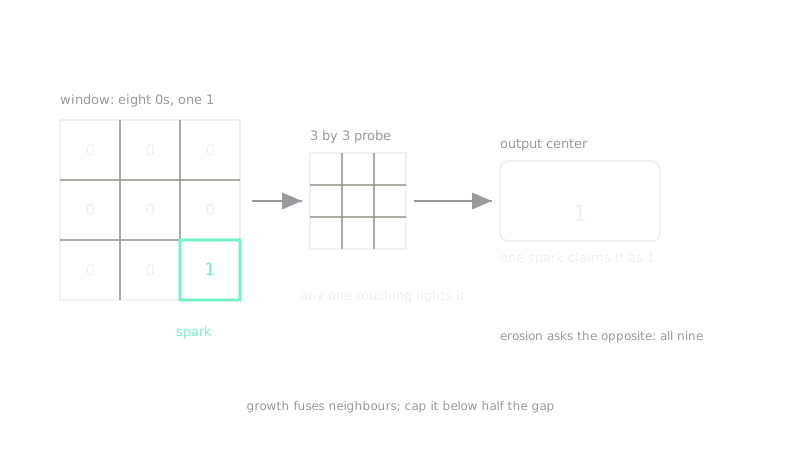
A window holds one 1 in the corner and zeros elsewhere:
With a full probe centered on this window, the corner 1 overlaps the probe, so the output center is 1. One survivor pixel claims the whole window, which is why dilation regrows what erosion spared. Flip the rule to require all nine cells be 1 and you get erosion instead — the same probe, the opposite question.
Code
The point of this snippet is the rule itself: one surviving pixel claims its whole window, which is the growth the prose describes.
window = [ [1, 0, 0], [0, 0, 0], [0, 0, 0],]
# dilate: output is 1 if ANY cell is 1; erode: 1 only if ALL cells are 1print(any(c for row in window for c in row))# -> Trueprint(all(c for row in window for c in row))# -> FalseWatch Out For
Separate objects fuse into one
Dilation cannot tell a gap you want from a gap you hate: grow too far and distinct cells, letters, or parts merge into a single blob. The symptom is a falling object count after cleanup. Cap iterations so growth stays below half the narrowest true gap, or switch to closing, which pulls boundaries back.
Brightening speckle on grayscale images
On grayscale, dilation is a local-maximum filter, so it fattens bright salt noise into blobs instead of removing it. The symptom is a starfield of white dots that grows with each pass. Fix: despeckle with a median filter first, or reach for opening, which erases small bright spots before regrowing the rest.
The Quick Version
- Dilation lights a pixel when any probe cell touches foreground.
- Objects swell, pinholes fill, and narrow gaps bridge shut.
- On grayscale it acts as a local maximum filter.
- Overgrowth fuses separate objects, so cap the probe and iterations.
- Pair with erosion as closing to fill holes without permanent swelling.