Histogram Equalization Spreads Flat Images
Histogram equalization spreads clustered gray levels with the cumulative distribution so the output histogram sits flat and hidden detail shows.
Why Does This Exist?
A photo can use 256 gray levels yet crowd 90 percent of its pixels into 30 of them, leaving the rest empty and killing contrast. Linear stretching rescales blindly, but the histogram itself knows exactly where pixels bunch. Equalization builds its remapping from the image's own cumulative distribution, spreading crowded levels apart and squeezing empty ones together. It is the standard rescue for washed-out scans, hazy frames, and flat medical slices, sitting at the distribution-driven branch of image enhancement. For color work the mapping belongs on luminance channels, as color spaces explains.
Think of It Like This
Reassigning seats in a crowded theater row
A theater row has 8 seats but everyone crowds into seats 3 through 7 while 0 through 2 sit empty. The usher reassigns: the two people in seat 3 move to seat 1, the four in seat 4 spread across seat 3, and so on, until all 8 seats hold people evenly. The crowd of pixels is unchanged in number but now fills the whole row of the range.
Where it stops: the usher fills seats mechanically even when the result looks harsh, pushing faces in a bright patch to posterized extremes, because equalization optimizes flatness instead of beauty.
How It Actually Works
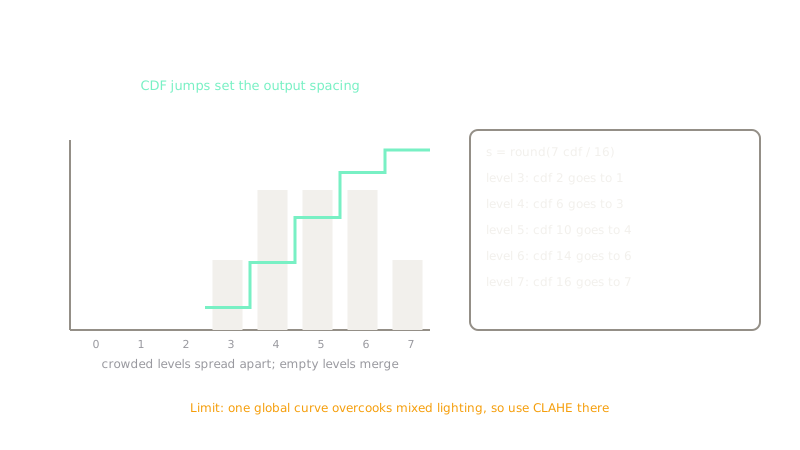
Let count pixels at level , total pixels, and levels. The normalized cumulative distribution is , and the mapping is . Crowded levels get large CDF jumps and hence wide output spacing, while empty levels get none and merge away. The routine equalizeHist does exactly this for 8-bit single-channel images in one call. Equalization assumes one global distribution describes the whole image, so mixed lighting breaks it: a dark foreground plus bright sky forces one compromise curve that grays the sky and overcooks faces, while near-flat regions get their background noise amplified into visible grain. Apply it to luminance channels for color work and switch to CLAHE when lighting varies across the frame.
Worked example
Take levels and 16 pixels with counts , so everything bunches in levels 3 to 7. Cumulative sums give . Multiply by and round: level 3 maps ; level 4 maps ; level 5 maps ; level 6 maps ; level 7 maps . The occupied band spreads to : the same pixels over nearly double the contrast range.
Code
The point of this snippet is the CDF mapping, not the imaging library: it reproduces the cumulative sums and the 1, 3, 4, 6, 7 outputs the prose derived by hand.
n = [0, 0, 0, 2, 4, 4, 4, 2] # 16 pixels on 8 levelstotal = sum(n)running = 0cdf = []for c in n: running += c cdf.append(running)mapping = [round(7 * v / total) for v in cdf]print(cdf)# -> [0, 0, 0, 2, 6, 10, 14, 16]print(mapping)# -> [0, 0, 0, 1, 3, 4, 6, 7]Levels 0 to 2 map to 0 on empty cumulative mass, which is exactly the merge behavior the diagram shows.
Watch Out For
Washed-out brights and blocked shadows
Global equalization happily pushes skin tones to chalk and shadows to ink to achieve flatness. The symptom is harsh, posterized portraits after enhancing unevenly lit photos. Reserve it for genuinely flat, single-illuminant images and use CLAHE otherwise.
equalizeHist on color images
The function expects one 8-bit channel, so handing it BGR applies the mapping per channel independently and wrecks hues. The symptom is neon color shifts across the frame. Convert to YCrCb or HSV, equalize the Y or V channel only, and merge back.
The Quick Version
- Equalization remaps levels through from the CDF.
- The fixture spreads counts from to .
equalizeHistworks on 8-bit single-channel images only.- Best for flat, evenly lit images; it overcooks mixed lighting and amplifies flat-region noise.
- For color, equalize luminance channels, never raw BGR.