RandAugment Augmentation
Skip the search. Pick N random operations at strength M for every image. Two knobs replace a thousand GPU hour policy hunt.
Why Does This Exist?
AutoAugment works, but its search costs more than many final runs: thousands of proxy hours to discover 25 subpolicies, and borrowed policies often mismatch the new domain anyway. Teams with one deadline can't afford that hunt for every dataset.
RandAugment (Cubuk et al., 2020) removes the search and keeps the gains. Fix a pool of 14 operations, pick uniformly per image, and apply each at global magnitude on a 0 to 10 scale, where counts the operations and sets their strength. Tuning two integers by short runs replaces searching thousands of combos. The family overview lives in image augmentation, and the mixing methods it pairs with are MixUp and CutMix.
Think of It Like This
A spice rack with two dials
You stop following 25 exact recipes and set two dials instead: how many spices per dish and how heavy each shake. Every dish comes out different, but the dials stay put all week and dinner still improves.
is the spice count and is the shake strength. It stops where taste stops: dinner guests tolerate any combo, while a classifier chokes when strong transforms erase the subject, so needs a ceiling your tongue never did.
How It Actually Works
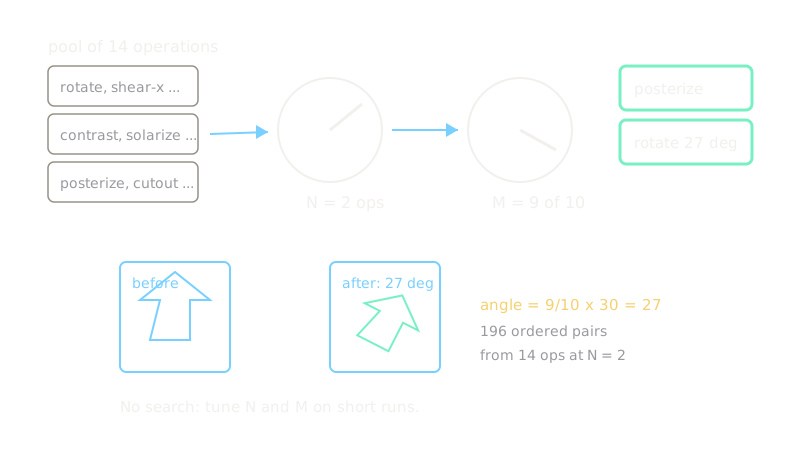
The pool holds 14 operations: rotate, shear, translate, contrast, solarize, posterize, color, brightness, and friends. For each image, sample operations uniformly with replacement and apply each at magnitude . Ordered pairs for total combos, so two integers buy plenty of variety.
Worked magnitude: rotate at M = 9
Rotate peaks at 30 degrees, and each operation scales linearly with out of 10:
So , applies two random operations near full strength, one possibly a 27-degree turn. Common starts are , at ImageNet scale and , on small photos, which tolerate less distortion.
Tuning order
Fix , sweep from 4 to 10 on short runs, then try and at the best . Larger images tolerate larger . Keep color-critical tasks at modest because strong posterize erases tints the label depends on.
Code
import random
POOL = [ "autocontrast", "equalize", "rotate", "solarize", "color", "posterize", "contrast", "brightness", "sharpness", "shear-x", "shear-y", "translate-x", "translate-y", "cutout",]
def randaugment_ops(n: int, seed: int = 7) -> list: """Sample N ops uniformly; each op later applies global magnitude M.""" rng = random.Random(seed) # fixed seed makes the demo repeatable return [rng.choice(POOL) for _ in range(n)]
print(randaugment_ops(2))# -> ['posterize', 'rotate']print(len(POOL), len(POOL) ** 2)# -> 14 196Seed 7 draws posterize then rotate, one of 196 ordered pairs from the 14-operation pool.
Watch Out For
Magnitude that deletes the subject
shear or large translate can push a small bird fully out of frame while keeping its tag. The symptom is tail classes collapsing even as RandAugment helps head classes. Cap near 5 on small images and verify with visual spot checks before long runs.
Stacking too many operations
at high compounds distortions until images leave the natural manifold. Training loss looks regularized while clean validation stalls. Start at and raise it only with evidence.
The Quick Version
- RandAugment samples N operations per image at global magnitude M with no search.
- N equals 2 from 14 operations gives 196 ordered pairs of variety from two knobs.
- Magnitude 9 turns a 30-degree rotate into 27 degrees.
- Fix N at 2 first, sweep M, then try neighboring N values.
- Cap M on small or color-critical images so transforms never erase the subject.