RGB
RGB builds every screen color from three lights. Red, green and blue. Each pixel stores one brightness per light, and the triple sets the exact shade you see.
Why Does This Exist?
Screens emit light and sensors count it, and both are built around three primaries because human eyes have three cone types. RGB is the native tongue of cameras, files, and displays: every photo starts as RGB numbers and every screen ends by glowing RGB triples.
That convenience is also the trap. RGB tangles color with brightness, so the same object gets a different triple under different light, which is why vision pipelines convert to spaces like HSV or LAB before deciding anything. Read the parent overview in color spaces for when to leave RGB behind.
This page covers the additive rule, the sRGB encoding your values actually use, and the two channel-order and overflow traps.
Think of It Like This
Three flashlights on one wall
Shine a red, a green and a blue flashlight at the same spot on a white wall. Red plus green paints yellow, all three at full blast make white, and dimming one shifts the mixture toward the other two.
Each flashlight dimmer is one RGB channel, for off and for full. A pixel is just three dimmer settings written down. The analogy stops here: flashlights add light linearly, but screens apply a gamma curve, so the middle dimmer setting looks darker than half brightness.
How It Actually Works
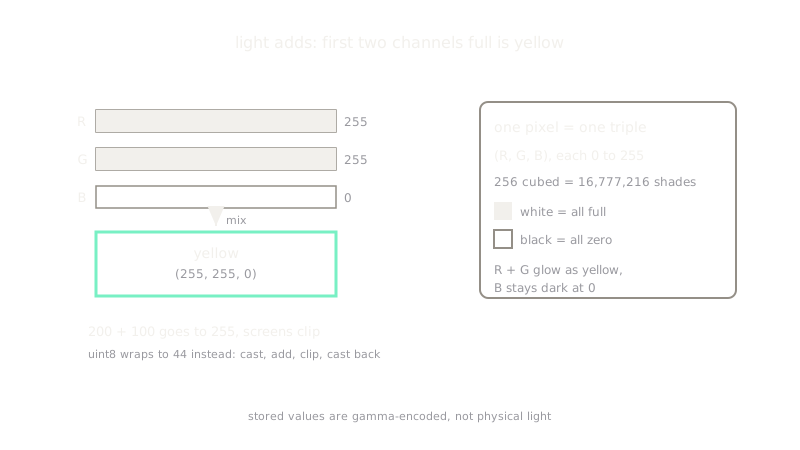
RGB is an additive model over three channels , where each letter means a stored intensity, not a wavelength. At 8 bits each, every channel is an integer from to , so one pixel is a point in a cube with possible addresses. Adding lights moves toward white: is pure red, is yellow, is white, is black. A sensor counts photons through three filters and a screen drives three subpixels; both agree on the channel idea but differ on exact shades, which is why calibrated work names a standard.
sRGB is the RGB you actually meet
Raw channel values are gamma-encoded under the sRGB standard: the stored number is roughly the physical brightness raised to , so mid-gray emits only about a fifth of full white light, not half. Do math on physical light (blending, simulating illumination) only after linearizing; feed networks the stored values as-is, since that is what they were trained on.
Worked example: mixing yellow and clipping white
Red plus green gives : yellow, with the blue channel untouched at . Adding is per channel, and screens clip instead of wrapping: on one channel stores , never . That clipping is why overexposed skies go flat white rather than cycling to odd colors.
Code
def add_channel(a, b): return min(a + b, 255) # screens clip; they never wrap around
yellow = (add_channel(255, 0), add_channel(0, 255), 0)print(yellow)# -> (255, 255, 0)print(add_channel(200, 100))# -> 255Watch Out For
OpenCV loads BGR while your model expects RGB
OpenCV reads images as blue-green-red from old hardware habits; cameras, files, PyTorch, and Matplotlib speak RGB. Feeding BGR straight into an RGB-trained network scrambles every color cue with zero errors raised. Convert once at load time and assert a known red patch reads high in channel 0.
uint8 addition wraps where light should clip
Adding two uint8 arrays in NumPy wraps modulo 256, so becomes , a dark glitch no screen would ever show. Cast to a wider type, add, clip to , then cast back.
The Quick Version
- RGB stores one intensity per channel: a point in a cube of addresses.
- Mixing is additive per channel, so red plus green reads as yellow and all three full reads as white.
- Stored values are gamma-encoded (sRGB), so mid-gray emits far less than half the light.
- OpenCV speaks BGR while models expect RGB; convert once at load time.
- Channel arithmetic must clip at , because uint8 addition wraps to dark glitches.