StyleGAN
StyleGAN separates what to draw from how to render it, so coarse layers pick the pose while fine layers pick freckles, each steerable on its own.
Why Does This Exist?
Earlier high-resolution generators drew sharp faces but offered no steering wheel. Their latent vector entangled everything: nudging one number changed age, pose, and lighting together, and blending two faces gave unpredictable mush. Artists could generate but not direct.
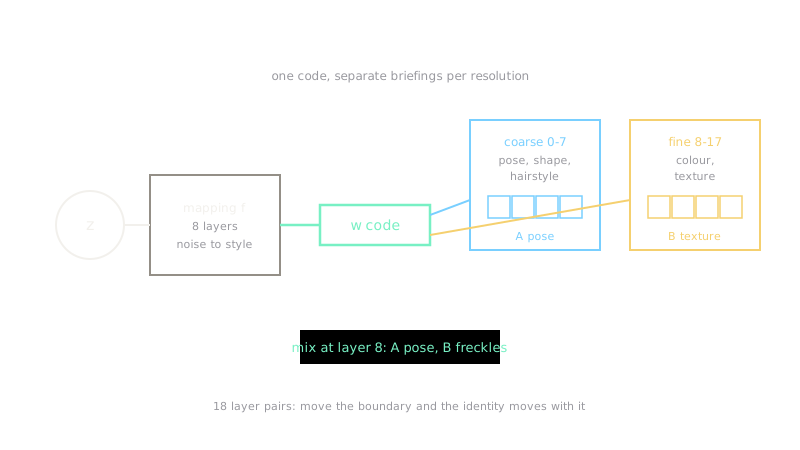
StyleGAN restructured the generator around control. A mapping network first converts noise into an intermediate code , and that code enters every synthesis layer separately through adaptive normalization. Coarse layers read as pose and shape, fine layers read it as color and microstructure. Style mixing, feeding one face's code to coarse layers and another's to fine layers, then works exactly as hoped. The generation setup it builds on is image generation, and judging its outputs fairly belongs to FID, IS, and KID.
This page covers the mapping network, the per-layer AdaIN step with hand-computed numbers, and the mixing boundary that is the real creative control.
Think of It Like This
A film director with separate departments
A director tells the set department "a rainy street", the costume department "wool coats", and the lighting crew "cold blue". Each department interprets the same script at its own scale, and the director can reshoot costumes without moving buildings.
The code is the script and each resolution layer is a department. Older generators handed every department an identical photocopy of one note. StyleGAN lets the director brief each department at its own level. The shoot fails when departments stop matching, mixed styles that clash, which is why the choice of mixing boundary matters.
How It Actually Works
From noise to style code
The mapping network , eight fully connected layers, converts a noise vector into an intermediate code . Each synthesis layer turns into a per-channel scale and bias and applies them to its normalized feature maps :
Here and are per-channel mean and standard deviation, so each layer standardizes its content before the style is imposed. Resolution decides meaning: layers 0 to 7 (up to 64 by 64) set pose, face shape, and hairstyle, while layers 8 to 17 set colors, skin texture, and background detail. Independent per-pixel Gaussian noise injected after each convolution supplies stochastic detail such as freckle placement and hair strands.
Worked AdaIN numbers
Take one channel with imposed style scale and bias . The mean is and the variance is , so . Then , and repeating for the other three cells gives . Same operation at every layer, with that layer's own scale and bias from .
Style mixing at the boundary
Feed face A's code to layers 0 to 7 and face B's to layers 8 to 17 at 1024 pixels: the output keeps A's head angle and jawline but wears B's skin tone, lighting, and freckles. Move the boundary to layer 4 and A's identity leaks into mid-level features; move it to layer 12 and B's pose starts intruding. The boundary position is the creative control, so log which ranges produced each result.
Code
def adain(x: list, scale: float, bias: float) -> list: """Impose style (scale, bias) on one single-channel feature map.""" flat = [v for row in x for v in row] mu = sum(flat) / len(flat) var = sum((v - mu) ** 2 for v in flat) / len(flat) sigma = var ** 0.5 + 1e-9 return [[round(scale * (v - mu) / sigma + bias, 2) for v in row] for row in x]
print(adain([[0.2, 0.8], [0.4, 0.6]], 1.5, 0.1))# -> [[-1.91, 2.11], [-0.57, 0.77]]Watch Out For
Blob artefacts from version 1 normalization
StyleGAN 1 occasionally renders odd round blobs, most visibly in skies and walls. The cause is the AdaIN step itself: normalizing each channel lets the generator hide signal magnitude that the next layer needs, and it compensates with localized magnitude spikes.
StyleGAN 2 redesigned normalization into weight demodulation, which removes the blobs. If you see them, you are running version 1, so upgrade instead of tuning around the artefact.
Mixing at an arbitrary boundary
Splicing at a careless layer pairs incompatible features, a young jawline with aged skin texture, and the output looks uncanny. Users blame the model when the boundary is at fault.
Start with the 0 to 7 versus 8 to 17 split and move the boundary deliberately. Boundaries inside coarse layers change identity; inside fine layers they change rendering.
The Quick Version
- StyleGAN maps noise through an 8-layer network into a style code .
- AdaIN imposes per-layer scale and bias on standardized features at every resolution.
- Layers 0 to 7 control pose and shape; layers 8 to 17 control color and microstructure.
- Style mixing feeds different codes to coarse and fine layers, and the boundary is the control.
- Version 1 blobs come from AdaIN itself; version 2 demodulation removes them.