Autoscaling Inference
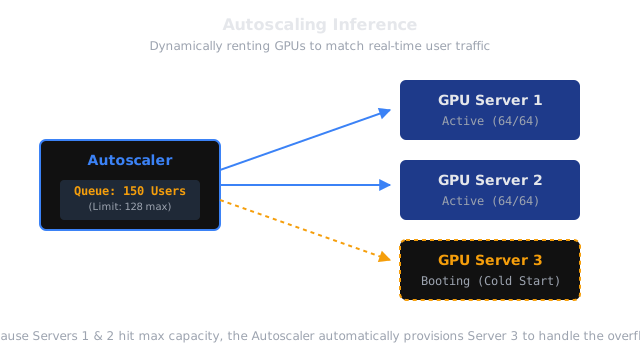
You don't want to pay for 10 GPUs at 3:00 AM when nobody is using your app. Autoscaling automatically spins up more servers when traffic spikes, and destroys them when traffic drops, saving you massive amounts of money.
Why Does This Exist?
In rest-api-serving, we learned how to wrap an ML model in an API. But what happens if your app suddenly goes viral, and 10,000 users all send a request at the exact same second?
A single GPU can only handle so many concurrent requests before it runs out of memory (OOM crashes) or the latency becomes completely unacceptable (e.g., users waiting 3 minutes for a response).
You could manually rent 100 GPUs and leave them running 24/7. But GPUs are incredibly expensive. If you pay $3.00/hr for 100 GPUs, that is $7,200 a day. If your traffic drops to zero at night, you are literally burning thousands of dollars an hour for idle machines.
Autoscaling is the infrastructure pattern that solves this. It relies on a Load Balancer and an Orchestrator (like Kubernetes) to automatically monitor your traffic. When traffic spikes, it automatically boots up new GPU servers. When traffic subsides, it automatically shuts them down.
Think of It Like This
Think of It Like This
Imagine a grocery store checkout area.
If there are 50 customers waiting in line (High Traffic), the store manager (The Autoscaler) opens 4 new cash registers and calls cashiers to staff them.
If it is 10:00 PM and there is only 1 customer in the store, the manager closes all the registers except one, allowing the other cashiers to go home (Saving money). The store dynamically adjusts its resources based exactly on the length of the queue.
How It Works
Autoscaling relies on defining Metrics and Thresholds.
- The Metric: The most common metric for ML inference is In-Flight Requests (Concurrency). CPU-usage is a terrible metric for GPUs.
- The Threshold: You tell the autoscaler: "A single GPU server can handle exactly 64 concurrent requests before latency gets too slow."
- The Scaling Event (Scale Up): If 100 requests arrive, the first 64 go to Server A. The remaining 36 requests are put in a waiting queue. The autoscaler sees the queue, realizes Server A is full, and instantly requests Server B from the cloud provider.
- The Scale Down: If traffic drops to 10 requests total, the autoscaler sees that Server B is completely empty. It sends a termination signal and destroys Server B to stop the billing cycle.
The Cold Start Problem
Autoscaling for traditional web apps (like a NodeJS backend) is easy because a web server boots up in 2 seconds. Autoscaling for Machine Learning is brutally difficult because of The Cold Start.
When the autoscaler decides to boot up Server B, three things must happen:
- The Cloud Provider must physically find and allocate a GPU (10 seconds).
- The server must download the massive 40GB model weights from AWS S3 (60 seconds).
- The Inference Engine must load the weights from RAM into VRAM and pre-compile the CUDA kernels (40 seconds).
This means the 36 users stuck in the waiting queue might have to wait 2 minutes before Server B is actually ready to answer them! To combat this, engineers use Over-provisioning (always keeping one extra server running just in case) or highly optimized distributed file systems to speed up the weight download.
Scale-to-Zero (Serverless)
If you are a startup with very low traffic, you can configure your autoscaler to Scale-to-Zero. If zero users hit your app for 15 minutes, the autoscaler shuts down every single server, bringing your hosting cost to exactly $0.00.
The tradeoff is severe: The very first user to visit your app in the morning will hit a massive Cold Start and have to wait 2 minutes for the page to load. (This is how services like Replicate and Baseten operate their cheaper tiers).
Watch Out For
The Thundering Herd.
If you launch a marketing campaign and 50,000 users hit your endpoint instantly, the autoscaler will panic and try to boot up 500 GPUs at once. The cloud provider (like AWS or GCP) will likely reject this request because they don't have 500 GPUs instantly available in your specific region. Your system will crash. For massive scheduled traffic spikes (like a Super Bowl ad), you must manually pre-scale your servers before the traffic hits.
The Quick Version
- Autoscaling dynamically adds or removes GPU servers based on real-time user traffic.
- The most reliable metric for scaling ML models is Concurrency (the number of in-flight requests), not CPU or GPU utilization.
- Autoscaling saves massive amounts of money by destroying idle servers.
- Cold Starts are the biggest challenge: booting a new ML server can take minutes due to the massive size of the model weights.
- Scale-to-Zero allows you to pay exactly $0.00 when you have no traffic, but punishes the first user with a massive loading delay.