Prompt and Model Versioning
A prompt buried in your source code is a deployment waiting to go wrong. Treating prompts as versioned artefacts — with a registry, a hash, and a rollback path — gives you the same control over your LLM's behaviour that you already have over your model weights.
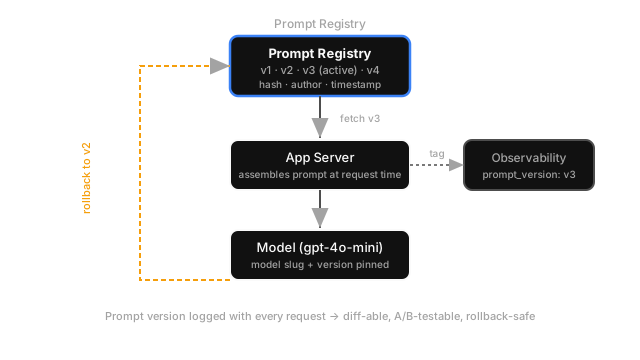
Why Does This Exist?
Most teams start by hardcoding prompts directly in the application source code. This works fine until it doesn't: a developer edits a system prompt to fix one behaviour, breaks another one, and nobody notices for three days because there's no record of what changed or when. By then, the bad version is in production and the git history has five other changes on top of it.
Prompts are not strings. They're deployable artefacts that change model behaviour just as surely as swapping the model weights themselves. And just like you wouldn't deploy a new model without staging, testing, and a rollback plan, you shouldn't deploy a new prompt without the same.
Think of It Like This
Think of It Like This
Think of a recipe that controls a restaurant's most popular dish. If the head chef scribbles changes on a napkin and hands it to the kitchen without anyone keeping a copy of the original, and the dish comes out wrong that night, you've got no idea what changed. A prompt registry is the recipe book: every version is numbered, dated, and attributed. If version 14 ruins the dish, you serve version 13 again in 30 seconds while you figure out why 14 failed.
How It Actually Works
Prompt versioning treats each unique prompt template as an immutable versioned object. When you need to change the prompt, you create a new version rather than overwriting the old one. Each version gets a hash (so you can detect accidental mutations), a timestamp, an author, and a changelog entry.
At runtime, the application server fetches the prompt by slug and version from the registry rather than reading a string from the source code. This means you can:
- Roll back a bad prompt change in seconds by pointing the live version reference to the previous entry — no code deploy needed.
- A/B test prompts by routing a percentage of traffic to version N and the rest to version N+1, then comparing output quality metrics.
- Diff any two versions to understand exactly what changed between a well-performing run and a broken one.
Model versioning follows the same logic. Pinning model: "gpt-4o-mini-2024-07-18" instead of model: "gpt-4o-mini" means the model your code runs against tomorrow is identical to what it ran against today, even if the provider silently updates the alias. Both the prompt version and the model version should be logged with every request so you can reproduce any response.
The Registry Shape
A minimal prompt registry entry looks like this:
{ "slug": "customer-support-triage", "version": 3, "hash": "sha256:a4f9...", "model": "gpt-4o-mini-2024-07-18", "template": "You are a helpful support agent...\n\nCustomer message: {{message}}", "variables": ["message"], "created_at": "2026-08-15T09:12:00Z", "author": "ml-team", "changelog": "Tightened tone; removed em-dashes that tripped the guardrail."}The variables field makes the template type-safe: the server validates that all required variables are present before sending the prompt, catching missing-context bugs at the request boundary instead of in the model response.
Code
from dataclasses import dataclassimport hashlib, json, datetime
@dataclassclass PromptVersion: slug: str version: int template: str model: str variables: list[str]
def render(self, **kwargs) -> str: missing = set(self.variables) - set(kwargs) if missing: raise ValueError(f"Missing variables: {missing}") result = self.template for k, v in kwargs.items(): result = result.replace(f"{{{{{k}}}}}", str(v)) return result
@property def hash(self) -> str: payload = json.dumps({"template": self.template, "model": self.model}) return hashlib.sha256(payload.encode()).hexdigest()[:16]
# Usage: fetch from registry, render, call model, log versionprompt = registry.get("customer-support-triage", version="active")user_prompt = prompt.render(message=user_input)
response = openai_client.chat.completions.create( model=prompt.model, messages=[{"role": "user", "content": user_prompt}])
# Tag every log with prompt + model version for debugginglogger.info("llm_call", extra={ "prompt_slug": prompt.slug, "prompt_version": prompt.version, "prompt_hash": prompt.hash, "model": prompt.model,})Watch Out For
Silent model alias drift.
OpenAI and Anthropic update what a non-dated alias (like gpt-4o-mini) points to without announcement. Your evals pass on Monday. By Wednesday, the provider rotated the alias and your production accuracy quietly dropped by 8%. Always pin to a dated model slug in production, and run your eval suite against any alias upgrade before it goes live.
The Quick Version
- Hardcoded prompts are undeployable: you can't roll them back, A/B test them, or diff them.
- A prompt registry stores versioned, hashed, attributed prompt templates. The app fetches the active version at request time.
- Every request logs the prompt version and model version — this is the minimum data you need to reproduce any response.
- Pin model slugs to dated versions (e.g.,
gpt-4o-mini-2024-07-18) to prevent silent behaviour changes from alias rotations.