Text Preprocessing
Before a model can read text, the text must be cleaned, normalized, and split into tokens so mathematical operations can be applied to it.
Why Does This Exist?
Machine learning models cannot read text. They only understand numbers. If you feed the string "The cats are running!" into a neural network, it will crash. Before any mathematical operation can happen, the text must be converted into a format the model can digest.
But raw text is extremely noisy. People use capital letters, punctuation, emojis, and different forms of the same word (like "run" and "running"). If we blindly convert every unique string into a unique number, the model will treat "Cat", "cat", and "cats" as three completely unrelated concepts. The vocabulary size would explode, and the model would fail to generalize.
Text preprocessing exists to strip away this noise, standardize the text, and chop it into discrete pieces (tokens) that can be mapped to a vocabulary. It is the mandatory first step of any classical NLP pipeline.
Think of It Like This
Think of It Like This
Imagine you are organizing a massive library, but the books are written in chaotic handwriting with arbitrary capitalization and random doodles in the margins.
Before you can index the books by their content, you first hire an assistant to transcribe everything into lowercase block letters (normalization), remove the doodles and punctuation (cleaning), ignore common filler words like "the" and "and" (stop-word removal), and group words like "running" and "ran" under the base word "run" (lemmatization). Only then can you actually start counting which topics appear in which books.
How It Actually Works
Text preprocessing in classical NLP is not a single operation, but a pipeline of sequential steps. The exact steps depend on the task, but a standard pipeline includes:
1. Cleaning and Normalization
The first pass removes formatting artifacts that carry no semantic meaning for the task. This often includes stripping HTML tags, removing URLs, or filtering out non-alphanumeric characters.
Normalization standardizes the remaining text. The most common normalization step is lowercasing. By converting "Apple" to "apple", we ensure the model learns a single representation for the word, regardless of whether it appeared at the start of a sentence.
2. Tokenization
Tokenization is the process of splitting the continuous string of text into discrete units called tokens. In classical NLP, tokens are usually whole words, separated by whitespace.
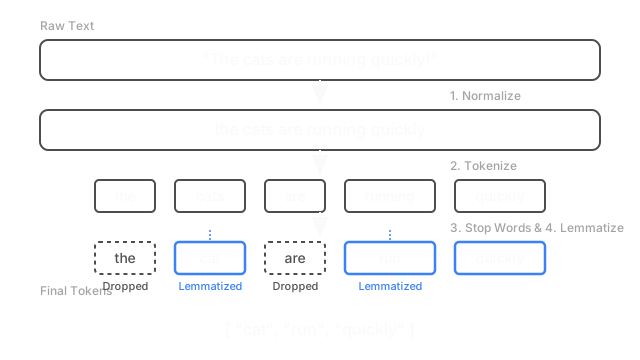
The sentence "The cats are running" becomes the list ["the", "cats", "are", "running"].
3. Stop Word Removal
Languages are full of words that provide grammatical structure but carry very little meaning on their own, such as "the", "is", "at", "which", and "on". These are called stop words.
In classical models like Bag of Words, leaving stop words in the text can overwhelm the signal from the actual content words, because stop words appear so frequently. Removing them reduces the vocabulary size and helps the model focus on the meaningful terms.
4. Stemming and Lemmatization
Even after lowercasing, a vocabulary might contain "run", "runs", "ran", and "running". To the model, these are distinct tokens, diluting the concept of "run" across four different dimensions.
We solve this by reducing words to their base form:
- Stemming uses crude, heuristic rules to chop the ends off words. For example, it might blindly chop "-ing" or "-s". It is fast but often produces non-words (e.g., "running" → "run", but "ponies" might become "poni").
- Lemmatization uses a dictionary and morphological analysis to find the true linguistic root (the lemma). It correctly maps "was" to "be" and "better" to "good". It is slower but far more accurate than stemming.
Code
In Python, the nltk (Natural Language Toolkit) library is the standard tool for classical text preprocessing.
import nltkfrom nltk.corpus import stopwordsfrom nltk.tokenize import word_tokenizefrom nltk.stem import WordNetLemmatizerimport string
# Download required NLTK data (run once)# nltk.download('punkt')# nltk.download('stopwords')# nltk.download('wordnet')
def preprocess_text(text: str) -> list[str]: # 1. Lowercase text = text.lower() # 2. Remove punctuation text = text.translate(str.maketrans('', '', string.punctuation)) # 3. Tokenize tokens = word_tokenize(text) # 4. Remove stop words stop_words = set(stopwords.words('english')) tokens = [t for t in tokens if t not in stop_words] # 5. Lemmatize lemmatizer = WordNetLemmatizer() tokens = [lemmatizer.lemmatize(t) for t in tokens] return tokens
sample = "The cats are running quickly, but the dog was faster!"print(preprocess_text(sample))# -> ['cat', 'running', 'quickly', 'dog', 'faster']Watch Out For
Don't over-preprocess for deep learning.
This classical pipeline is essential for Bag of Words or TF-IDF. However, modern LLMs and transformer-based models (like BERT or GPT) want the punctuation, capital letters, and stop words, because those carry crucial context and grammatical nuance. If you use a classical preprocessing pipeline before feeding text into an LLM, you will destroy its ability to understand the sentence.
Domain-specific stop words.
A standard stop-word list might remove words that are highly relevant in a specific domain. For example, if you are analyzing medical text, "the" is a stop word, but if you blindly remove "it", you might alter the meaning of a sentence like "the patient contracted it". Always review your stop words against your specific dataset.
The Quick Version
- Machine learning models require numbers, not raw text strings.
- Text preprocessing is a sequential pipeline that cleans, normalizes, and tokenizes text.
- Common steps include lowercasing, removing punctuation, and filtering out stop words.
- Lemmatization and stemming reduce words to their base form, consolidating variations like "run" and "running" into a single token.
- This classical pipeline is required for older algorithms but is largely obsolete (and even harmful) for modern deep learning models that rely on full sentence context.