Multimodal RAG
Instead of just embedding text, Multimodal RAG converts images, charts, and text into a shared vector space, allowing you to answer questions about complex visual data.
Why Does This Exist?
In traditional RAG pipelines, the ingestion process strips away everything that isn't text. If a PDF contains a crucial bar chart showing 2024 revenue growth, the PDF parser usually ignores it, or mangles it into unreadable gibberish. If a user then asks the RAG system, "What was our revenue growth in 2024?", the system will confidently say it doesn't know, even though the answer is clearly visible on page 4 of the report.
As enterprises attempt to automate workflows over architectural diagrams, medical X-rays, financial charts, and slide decks, text-only RAG completely fails.
Multimodal RAG solves this by treating images as first-class citizens. Using specialized models (like CLIP or modern Vision-Language Models), the system generates embeddings for both the text and the images. Crucially, these embeddings live in the exact same mathematical space.
Think of It Like This
Organizing a museum catalog
Imagine you work in a museum cataloging historical artifacts.
Standard RAG: You only index the written descriptions of the artifacts. If someone asks for "a red vase from the Ming dynasty," you search the text database. If an intern forgot to write "red" in the description of a vase, you will never find it, even though you have a perfectly good photo of it on your computer.
Multimodal RAG: You run every photo of an artifact through an AI that understands what things look like. The AI places the photo of the vase in the "red," "ceramic," "ancient" section of the catalog. When someone asks for a "red vase," you can search the photo catalog directly using your text query. You find it instantly, regardless of what the written description says.
How It Actually Works
There are two primary architectural approaches to building Multimodal RAG.
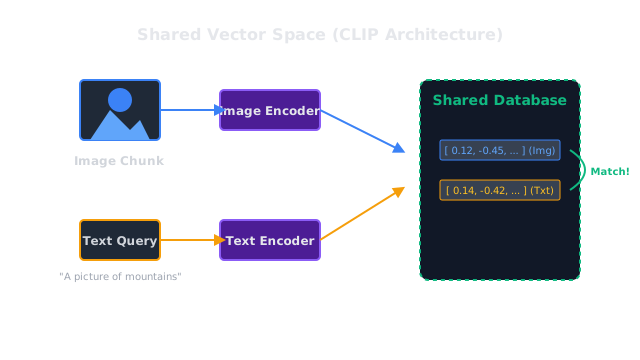
Approach 1: Shared Vector Space (CLIP-style)
This is the most elegant, math-heavy approach. Models like CLIP (Contrastive Language-Image Pretraining) are trained simultaneously on images and their text captions. Through contrastive learning, the model is forced to output the exact same vector for a picture of a dog as it does for the text string "a picture of a dog."
- Ingestion: During document parsing, you split the text into chunks, and you crop out the images. You run both through the multimodal embedding model. The text vectors and the image vectors are stored in the same vector database.
- Retrieval: The user asks a text question. The question is embedded using the same model. The database returns the closest vectors—which might be a text chunk, or it might be an image!
- Generation: The retrieved images and text are fed into a multimodal LLM (like GPT-4o or Claude 3.5 Sonnet) which can "see" the image and generate the final answer.
Approach 2: Image-to-Text Conversion (VLM-style)
The CLIP approach struggles with highly complex, dense charts (like a financial table or a dense engineering diagram) because CLIP focuses on broad semantic concepts, not OCR (Optical Character Recognition).
The second approach uses a Vision-Language Model (VLM) during ingestion.
- Ingestion: When an image is found in a PDF, it is sent to a powerful VLM (like GPT-4o). The prompt says: "Describe this image in extreme detail. If it is a chart, extract the data points. If it is a diagram, explain the flow."
- Embedding: The VLM outputs a dense paragraph of text describing the image. This text is embedded using a standard text embedding model.
- Retrieval: The system functions exactly like standard text RAG. It retrieves the text description of the image, and the final LLM reads the description to answer the user's question.
Code
This code demonstrates the "Shared Vector Space" approach using the open-source clip-ViT-B-32 model via the sentence-transformers library. It embeds an image and a text string into the same space.
from sentence_transformers import SentenceTransformer, utilfrom PIL import Image
# Load the multimodal CLIP model# This model can embed both images and text into the exact same vector spacemodel = SentenceTransformer('clip-ViT-B-32')
# 1. Embed an image (Simulating ingestion)# Let's say we have a picture of a golden retriever in our datasetimage_path = "golden_retriever.jpg"try: img = Image.open(image_path) image_embedding = model.encode(img)except FileNotFoundError: print("Image not found. Creating a dummy vector for demonstration.") import numpy as np image_embedding = np.random.randn(512) # CLIP outputs 512-dim vectors
# 2. Embed a text query (Simulating search)text_query = "a fluffy yellow dog"text_embedding = model.encode(text_query)
# 3. Calculate the similarity# Because they are in the same space, we can just use cosine similaritysimilarity = util.cos_sim(image_embedding, text_embedding)
print(f"Query: '{text_query}'")print(f"Similarity to image: {similarity.item():.4f}")# If you run this with a real image of a golden retriever, the similarity # will be incredibly high (e.g., 0.85+), proving the text matched the image perfectly!Watch Out For
Context window overload
If you use Multimodal LLMs in the final generation step, passing retrieved images into the context window is extremely expensive. A single image passed into GPT-4o can consume between 200 and 1,000 tokens depending on the resolution. If your vector search returns 5 images and 10 text chunks, your generation step will be slow and you will burn through API credits rapidly.
The Quick Version
- Standard RAG ignores images, charts, and diagrams, losing critical information during ingestion.
- Multimodal RAG solves this by making images searchable.
- Approach 1 uses a joint embedding model (like CLIP) that mathematically forces images and text into the exact same vector space, allowing text queries to directly retrieve images.
- Approach 2 uses a Vision model during ingestion to write detailed text summaries of every image, and then performs standard text RAG on those summaries.