Tool Result Curation
When an agent uses a tool (like a database query), the tool often returns thousands of lines of raw JSON. If you pass all that JSON back to the agent, the agent gets overwhelmed and crashes. Curation is the act of filtering tool outputs before the agent sees them.
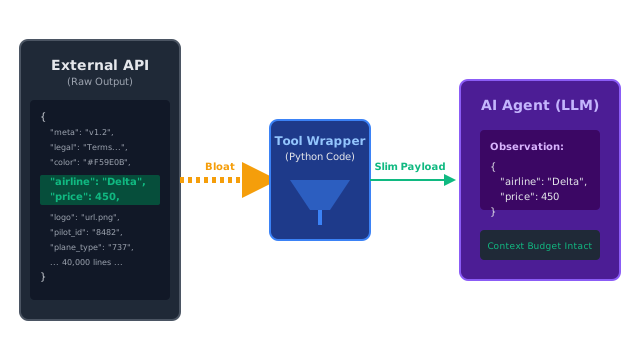
Why Does This Exist?
In the ReAct Pattern, an LLM decides to take an action, and the Python orchestrator executes a tool (like an API call).
Imagine you build an AI Travel Agent. The agent decides it needs to find flights to Tokyo. It outputs: Action: SearchFlights(destination="Tokyo").
Your Python backend executes this tool by querying the real Expedia API. The Expedia API returns a massive, 40,000-line JSON payload containing not just the flight times, but the hexadecimal color codes for the airline logos, the legal terms of service for the baggage fees, and the internal database IDs of the pilots.
If your Python backend takes this 40,000-line JSON and injects it back into the LLM as the Observation, two things happen:
- You blow past your Context Budget and the API throws a "Token Limit Exceeded" error.
- If it does fit, the LLM suffers from Context Degradation, getting distracted by the baggage fee legalese and hallucinating the flight times.
Tool Result Curation is the mandatory step between executing an external tool and returning the observation to the LLM. You must curate (filter, slice, or summarize) the data so the LLM only sees exactly what it needs to see.
Think of It Like This
The Assistant and the Database
You (the LLM) ask your assistant to look up the sales numbers for Q3.
Uncurated: The assistant brings you the entire physical filing cabinet containing 50,000 invoices, dumps it on your desk, and says, "Observation: Here is the data."
Curated: The assistant opens the filing cabinet, adds up the invoices on a calculator, writes "$450,000" on a post-it note, and hands you the note.
How It Actually Works
There are three common ways to curate tool results, ranging from hardcoded logic to LLM-driven filtering.
1. Hardcoded Schema Mapping (Best Practice)
When building the Python tool, you write explicit code to strip out useless JSON keys. If the API returns 50 fields per flight, you map it down to 3 fields: airline, departure_time, and price. You return this tiny dictionary to the LLM.
2. Pagination/Slicing
If a tool searches a database for "Users named John," and the database returns 5,000 rows, you cannot send 5,000 rows to the LLM. You curate by slicing the result: return results[:5]. You then tell the LLM: "Observation: 5,000 results found. Here are the top 5."
3. LLM Summarization (Context Compaction)
If the tool returns a massive block of unstructured text (like a web scraper returning an entire Wikipedia page), you cannot use JSON mapping. Instead, you use a cheaper, faster LLM to summarize the scraped text (see Context Compaction) before passing it back to the main agent.
Code
This code demonstrates how a Python tool intercepts a massive API payload and curates it before returning it to the LLM.
import json
# Pretend this is a real external API returning massive amounts of fillerdef external_flight_api(destination): return { "metadata": {"api_version": "v3.1.4", "server_ms": 42}, "legal": "Terms of service apply. Baggage fees are non-refundable...", "flights": [ { "id": "84jd92-11", "airline": "Delta", "price_usd": 450.00, "departure_time": "14:00", "airline_logo_url": "https://assets.delta.com/logo_small.png", "pilot_certification_tier": "Gold" }, # ... imagine 50 more complex flight objects here ... ] }
# The actual tool exposed to the Agentdef get_flights_tool(destination): print(f"Tool Executed: Fetching flights to {destination}...") raw_payload = external_flight_api(destination) # 🚨 ANTI-PATTERN: Returning the raw payload # return json.dumps(raw_payload) # (This will flood the LLM's context window with legal text and image URLs) # ✅ BEST PRACTICE: Tool Result Curation curated_results = [] # Slice to top 3 (Pagination) for flight in raw_payload["flights"][:3]: # Map to a slim schema (Hardcoded mapping) slim_flight = { "airline": flight["airline"], "price": flight["price_usd"], "time": flight["departure_time"] } curated_results.append(slim_flight) final_observation = { "status": "success", "total_results_found": len(raw_payload["flights"]), "top_results": curated_results } # Return the highly compressed, relevant data to the LLM return json.dumps(final_observation)
# --- Execution ---observation = get_flights_tool("Tokyo")print("\n--- What the LLM actually sees ---")print(observation)
# -> Tool Executed: Fetching flights to Tokyo...# -> # -> --- What the LLM actually sees ---# -> {"status": "success", "total_results_found": 1, "top_results": [{"airline": "Delta", "price": 450.0, "time": "14:00"}]}Watch Out For
Over-Curation
If you curate the data too aggressively, the LLM will not have enough information to fulfill the user's request. If you curate the flight data to only include the price, and the user asks "What time does the $450 flight leave?", the LLM will hallucinate a time because you stripped it out of the observation. Tool curation is a delicate balance between saving context space and preserving necessary facts.
The Quick Version
- Autonomous agents use tools (APIs, databases) to interact with the world.
- Raw tool outputs are often massively bloated with irrelevant metadata, legal text, and pagination limits.
- Injecting raw outputs into the prompt causes Token Limit errors and Context Degradation.
- Tool Result Curation is the act of wrapping external APIs in Python functions that filter, slice, or map the raw data into slim payloads before the agent ever sees it.