Domain Name System (DNS)
On this page
Overview
The Domain Name System (DNS) is the phone book of the internet. Humans access information online through domain names, like google.com or example.com. Web browsers interact through Internet Protocol (IP) addresses. DNS translates domain names to IP addresses so browsers can load internet resources.
🧠 Mental model: DNS is like the contacts app on your phone. You remember the name "Alice," but your phone needs her actual phone number to make the call. DNS does this translation instantly for the web.
Key Concepts
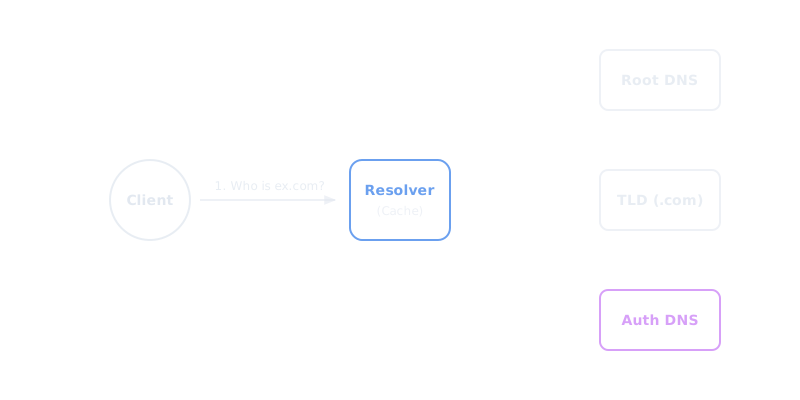
DNS resolution involves several servers working together to find the IP address:
- DNS Resolver (Recursive Resolver): The librarian who receives your initial request (often operated by your ISP). It tracks down the IP address by querying the other servers in the chain.
- Root Nameserver: The first step in translating human-readable host names. It points the resolver to the appropriate TLD server based on the domain extension (e.g., .com, .net).
- TLD Nameserver: The Top-Level Domain server hosts the next step of information. For a .com domain, it points to the authoritative nameserver for that specific domain.
- Authoritative Nameserver: The final stop. This server actually holds the DNS records for the domain (like the A record for the IP address) and returns it to the resolver.
Important DNS Records
| Record Type | Purpose | Example Value |
|---|---|---|
| A Record | Maps a domain name to an IPv4 address. | 192.0.2.1 |
| AAAA Record | Maps a domain name to an IPv6 address. | 2001:0db8:85a3:0000:0000:8a2e:0370:7334 |
| CNAME Record | Maps a domain name to another domain name (alias). | www.example.com -> example.com |
| NS Record | Specifies the authoritative nameservers for the domain. | ns1.example.com |
Trade-offs
DNS relies heavily on caching to reduce latency and load on the authoritative servers. The tradeoff is controlled by the TTL (Time To Live) value on DNS records.
- High TTL (e.g., 24 hours): Reduces traffic to your nameservers and speeds up resolution for clients. However, if you need to change a server's IP address, it takes 24 hours for all clients worldwide to see the update.
- Low TTL (e.g., 60 seconds): Allows for rapid failover and dynamic routing (like pointing users to the nearest healthy datacenter). The downside is increased query volume to your DNS provider and slightly higher latency for clients on average since cache misses are more frequent.
Interview Tips
- Always mention DNS caching when discussing system latency. Caching happens at the browser, OS, router, and ISP levels.
- Use DNS as a global load balancing tool. Mention that DNS can route users to the geographically closest datacenter (GeoDNS) or distribute traffic using Round Robin DNS.
- When changing infrastructure or migrating servers, point out that you must lower the TTL well in advance to ensure smooth cutover.
Summary
- DNS translates human-readable domain names into machine-readable IP addresses.
- The resolution process involves recursive resolvers, root servers, TLD servers, and authoritative nameservers.
- A Records point to IPv4 addresses, AAAA to IPv6, and CNAMEs act as aliases.
- Caching is heavily used; TTL (Time To Live) dictates how long records are cached.
- DNS can be used for coarse-grained geographic load balancing and routing.