Object & Blob Storage
On this page
Overview
Object storage (or blob storage) is an architecture that manages data as objects, as opposed to file systems which manage data as a directory hierarchy, or block storage which manages data as sectors and tracks. It is designed to store massive amounts of unstructured data like images, videos, backups, and logs efficiently and cheaply.
Key Concepts
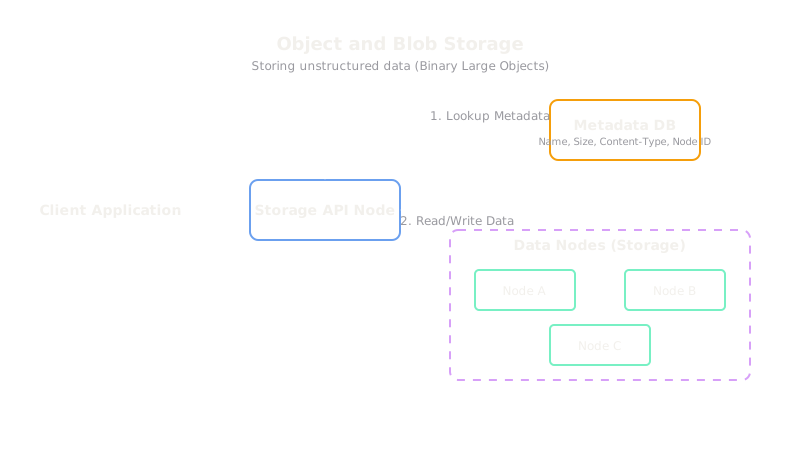
Unlike traditional file systems, object storage flatly organizes data. Each object consists of three things:
- The Data (Blob): The actual file contents (a photo, a log file, a video).
- Metadata: Customizable tags attached to the object (e.g., author, content-type, or a custom application ID) which are highly queryable.
- Global Unique Identifier (Key): A unique address (often a hash or a URL) that allows the object to be found over a network.
Comparison with File and Block Storage
| Type | Structure | Best for | Examples |
|---|---|---|---|
| Block Storage | Raw disk blocks mounted to an OS | Databases, running VMs, high-IOPS needs | AWS EBS, SAN |
| File Storage | Hierarchical directories and files | Shared network drives, legacy applications | NFS, AWS EFS |
| Object Storage | Flat namespace with unique keys | Unstructured media, backups, data lakes | AWS S3, GCS |
Trade-offs
Object storage provides virtually infinite scalability and is highly durable and cheap because data is easily replicated across commodity hardware. The primary tradeoff is latency and mutability. Object storage is not meant for high-IOPS transactional data. You generally cannot modify a small piece of an object; you must rewrite the entire object. It is strictly eventual consistency in older systems, though modern systems like S3 now offer strong read-after-write consistency.
Interview Tips
- Never use a relational database to store large files (like profile pictures). Store the image in Object Storage and store the URL to the image in the database.
- Mention combining Object Storage with a CDN. This is the classic pattern for serving static assets and media at scale globally.
- If asked about cost optimization, mention lifecycle policies (e.g., moving older logs from standard S3 to Glacier for cheaper cold storage).
Summary
- Object storage manages data as flat objects (blob + metadata + unique ID).
- It is infinitely scalable, highly durable, and very cheap compared to block storage.
- It cannot be mounted like a hard drive; it is accessed via HTTP/REST APIs.
- It does not support in-place edits (modifying part of a file); objects are overwritten.
- Always pair object storage with a CDN for delivering media to end users.