Bilateral Filter Edge Smoothing
A bilateral filter blends only neighbours that are close and look similar. Flat zones smooth out while true edges refuse to mix.
Why Does This Exist?
The Gaussian filter blurs across edges because it weighs neighbours by distance alone: a dark pixel happily blends with a bright neighbour just because it is nearby. But most photos are flat regions divided by sharp boundaries, and mixing across a boundary destroys exactly the structure later steps need.
The bilateral filter adds a second opinion, similarity, so a neighbour votes only when it is near and alike. It is the edge-aware member of the smoothing family: use it for denoising photos you will display, where median filter output looks patchy and Gaussian output looks melted.
The one idea you need first. A Gaussian blur is a weighted mean with weights falling off by distance. The bilateral filter keeps that idea and multiplies in a second fall-off by brightness difference. If weighted means are unfamiliar, the Gaussian page works one through first.
Think of It Like This
A club with two bouncers
Entry needs two stamps: you must live nearby (spatial closeness) and dress like the regulars (similar brightness). A neighbour in the wrong outfit is turned away, which is how an edge pixel gets excluded from the blend. A Gaussian club employs only the first bouncer, so anyone nearby walks in and the party, your edge, gets diluted.
The analogy stops at arithmetic: the bouncers multiply smooth Gaussian weights rather than stamping yes or no, so a slightly different neighbour gets a slightly smaller vote instead of rejection.
How It Actually Works
Each neighbour's vote multiplies two Gaussian weights. The spatial weight falls with distance and is set by , which controls how far the filter looks. The range weight falls with brightness difference and is set by , which controls how different a pixel may be and still count. With the center value and a neighbour value:
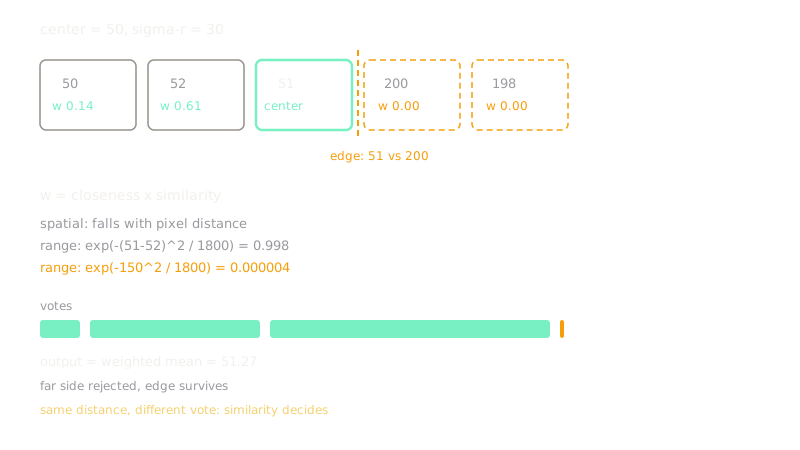
The output is the weighted mean of the neighbourhood using , divided by the sum of the weights so the brightness stays calibrated. Across a strong edge the range term collapses toward zero, the far side contributes nothing, and the edge survives. In flat regions all neighbours look similar, the range term sits near one, and the filter behaves like an ordinary Gaussian.
Worked example
Take a center pixel of value with neighbour A at and neighbour B at , and set . The range weight of A is , nearly a full vote. The range weight of B is , effectively zero. Same distances, wildly different votes, and the edge between and never mixes.
Code
The point of this snippet is the gate in action: run the weights on a tiny 1-D signal crossing an edge and watch the far side drop out of the average.
import numpy as np
signal: np.ndarray = np.array([50.0, 52.0, 51.0, 200.0, 198.0])center: int = 2sigma_s: float = 1.0sigma_r: float = 30.0
pos: np.ndarray = np.arange(signal.size) - centerspatial: np.ndarray = np.exp(-(pos**2) / (2 * sigma_s**2))range_w: np.ndarray = np.exp(-((signal - signal[center]) ** 2) / (2 * sigma_r**2))weights: np.ndarray = spatial * range_wprint(weights) # -> [1.35e-01 6.06e-01 1.00e+00 2.67e-06 8.27e-07]print(float(weights @ signal / weights.sum())) # -> 51.27072321480588The last two weights print near zero: the -valued pixels across the edge are excluded, and the output averages only the similar side.
Watch Out For
Range sigma too wide degrades to Gaussian
Crank far above the image contrast and every neighbour counts as similar, so the filter blurs across edges exactly like the Gaussian you meant to beat. The symptom is melted boundaries despite paying bilateral cost. Set near the noise level: small enough to reject true edges, large enough to accept grain.
The Quick Version
- The bilateral filter weights each neighbour by distance times brightness similarity, then takes a weighted mean.
- Flat regions smooth normally while strong edges block blending across them.
- Sigma-s sets how far the filter reaches and sigma-r sets how different a voter may be.
- Setting sigma-r near the noise level keeps edges while killing grain.
- It costs far more than a Gaussian because the weights change at every pixel.