Gaussian Filter Smooths With a Bell Curve
A Gaussian filter blends each pixel with its neighbours, weighting close neighbours most by a bell curve, so noise fades while shapes stay fair.
Why Does This Exist?
A box blur treats a distant neighbour the same as an adjacent one, which is why it looks harsh and erases corners. Real optical blur falls off with distance, brightest at the center and fading outward. The Gaussian kernel copies that falloff with the bell curve , where (sigma) sets the width of the trust.
It is the default pre-filter in the smoothing family and the opening step of the Canny detector, which differentiates noise without it. When edges themselves must survive the smoothing, step up to the bilateral filter; when salt-and-pepper spikes dominate, prefer the median filter.
Think of It Like This
Asking neighbours for advice
You weight advice by distance: your own judgment most, next-door neighbours somewhat, strangers across town barely. Sigma is how far your trust reaches. A tiny sigma trusts only yourself, so nothing changes; a huge sigma trusts the whole town equally, and every opinion blurs into mush. Good smoothing, like good advice, listens widely but trusts locally.
Where it stops: neighbours cannot fix a lie everyone repeats, and a Gaussian cannot fix structured interference or dead pixels, because it only averages whatever values it is given.
How It Actually Works
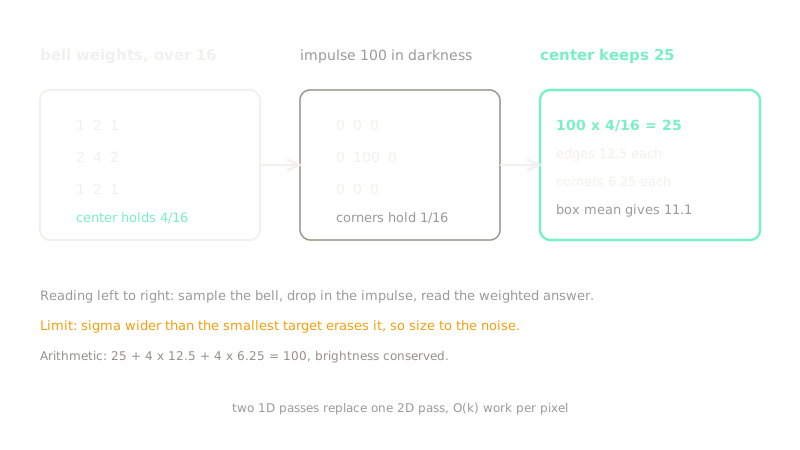
Sample the bell curve over a window, typically or , and normalize so the weights sum to 1. The classic kernel with is:
The center carries of the vote, edge-adjacent cells each, and corners only each. Because the 2D bell curve factors into horizontal times vertical, filtering runs as two 1D passes: work per pixel instead of , which is what separability buys.
Worked example
Drop one bright impulse of value into darkness:
The outputs follow directly from the weights. Center: . Each edge-adjacent pixel: . Each diagonal pixel: . Conservation check: , so no brightness leaks away. A box mean would put everywhere in the window, keeping less of the spike at the center and spreading more to the corners, which is exactly the harshness the bell curve avoids.
Code
Pure Python, no imports: apply the kernel to the impulse fixture and confirm the hand computation, including conservation.
kernel = [ [1, 2, 1], [2, 4, 2], [1, 2, 1],]impulse = [ [0, 0, 0], [0, 100, 0], [0, 0, 0],]
out = [ [sum(kernel[1 - di][1 - dj] * impulse[i + di][j + dj] for di in (-1, 0, 1) for dj in (-1, 0, 1) if 0 <= i + di < 3 and 0 <= j + dj < 3) / 16 for j in range(3)] for i in range(3)]print(out[1][1], out[0][1], out[0][0])# -> 25.0 12.5 6.25print(sum(map(sum, out)))# -> 100.0Center , edge , corner , total : brightness is preserved, just redistributed with the center trusted most.
Watch Out For
Sigma too large erases small objects
Every sigma increment widens the bell and mixes in more distant pixels. The symptom is small targets shrinking below detection size after the blur. Size the window to the noise, not the objects: use the smallest sigma that kills the grain, and never out-blur the smallest target.
Blurring across edges then wondering where they went
A Gaussian mixes pixels from both sides of every boundary, so strong edges come out rounded and thin lines fade. The symptom is a Canny detector returning broken contours on an over-smoothed image. Fix: keep sigma small before detection, or switch to the edge-preserving bilateral filter when the boundary itself is the signal.
The Quick Version
- Gaussian weights fall off as a bell curve controlled by sigma, with close neighbours trusted most.
- The kernel sums to , with at the center, on edges, and in corners.
- The impulse fixture gives center , edges , diagonals , conserving total.
- The kernel separates into two 1D passes, cutting per-pixel work from to .
- It is the standard hush before Sobel, Laplacian, and Canny, but it rounds edges and erases small targets when sigma runs too large.