Experiment Tracking
When you train 50 different models in a week, you will forget which hyperparameters produced the best one. Experiment tracking is a digital lab notebook that automatically records exactly how every model was built.
Why Does This Exist?
Machine learning is inherently experimental. To build a good model, you have to try dozens of combinations:
- Run 1: Learning rate 0.01, Batch size 32. Result: 85% accuracy.
- Run 2: Learning rate 0.001, Batch size 64. Result: 88% accuracy.
- Run 3: Added a new feature column. Result: 82% accuracy.
If you don't write this down, by Run 14 you will have completely forgotten what settings you used in Run 2. Data scientists traditionally tried to solve this by creating terrible spreadsheets or naming their files model_final_v3_really_final.pkl.
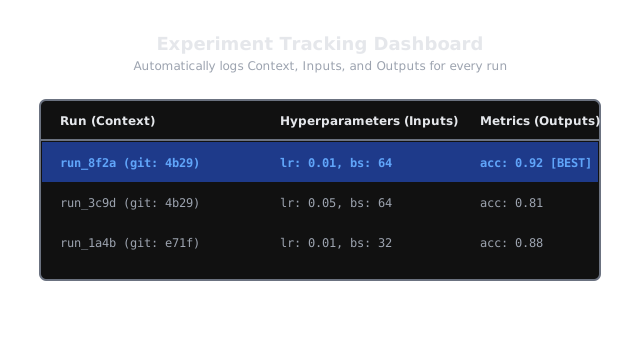
Experiment Tracking tools (like MLflow, Weights & Biases, or Comet) solve this by automatically logging every detail of every training run to a centralized dashboard.
Think of It Like This
Think of It Like This
Imagine a chemist trying to cure a disease. Every day, they mix slightly different chemicals in a beaker and test the result on a petri dish.
If they just throw the beakers on a shelf without labeling them, they might accidentally cure the disease, but they won't know how to replicate it. An Experiment Tracker is the strict lab notebook that forces the chemist to write down the exact temperature, the exact chemical supplier, and the exact timestamps of every single attempt, so that the "miracle cure" can be perfectly reproduced in a factory.
How It Actually Works
When you add an experiment tracker to your Python training script, it logs four distinct categories of metadata for every "Run":
1. Parameters (The Inputs)
The configuration used to run the training. This includes learning rate, batch size, number of epochs, model architecture (e.g., ResNet50), and regularizer weights.
2. Metrics (The Outputs)
The numbers that tell you if the model is good. This includes validation loss, accuracy, F1-score, or custom business metrics. Trackers don't just log the final number; they log the metric at every step so you can plot loss curves and see if the model overfit at Epoch 40.
3. Artifacts (The Files)
The physical files generated by the run. This includes the actual saved model weights (e.g., model.pt), confusion matrix images, or sample predictions.
4. Lineage & Environment (The Context)
How can we reproduce this tomorrow? The tracker logs the exact Git commit SHA of the code, the hashes of the datasets used, and the exact Python environment (e.g., requirements.txt or Docker image) the model was trained in.
Code
Here is how simple it is to add MLflow to a standard scikit-learn script. You just wrap your training code in a mlflow.start_run() block.
import mlflowimport mlflow.sklearnfrom sklearn.ensemble import RandomForestClassifierfrom sklearn.metrics import accuracy_score
# Set the experiment name (creates a folder in the UI)mlflow.set_experiment("Customer_Churn_Prediction")
# The hyperparameters we want to test todayparams = {"n_estimators": 100, "max_depth": 5}
# Start the trackerwith mlflow.start_run(run_name="RandomForest_Attempt_1"): # 1. Log the parameters mlflow.log_params(params) # Train the model clf = RandomForestClassifier(**params) clf.fit(X_train, y_train) # Evaluate the model predictions = clf.predict(X_test) accuracy = accuracy_score(y_test, predictions) # 2. Log the metric mlflow.log_metric("accuracy", accuracy) # 3. Log the model artifact mlflow.sklearn.log_model(clf, "model") print(f"Run completed with accuracy: {accuracy}") # When you open the MLflow UI, you will see a beautiful table # comparing this run to all previous runs!Watch Out For
Logging Data Paths instead of Data Hashes.
It is common to log data_path: "s3://bucket/train.csv" as a parameter. But what happens if someone overwrites that CSV file a week later? You look at your tracker, you rerun the code using the same path, but you get a completely different model. To achieve true reproducibility, you must log the hash (or specific version ID) of the data, not just the path. Modern systems use tools like DVC (Data Version Control) to solve this.
The Quick Version
- Experiment Tracking replaces messy spreadsheets and file naming conventions with a centralized dashboard.
- For every training run, the tracker records the Parameters (inputs), Metrics (outputs), Artifacts (files), and Lineage (git commit and environment).
- Tools like MLflow and Weights & Biases allow data scientists to visually compare hundreds of runs to find the optimal model.
- It is the foundation of reproducibility; without a tracker, a good model is just a lucky accident.