Memory Offload (CPU & NVMe)
When a model is too big to fit into the ultra-fast GPU memory, you can temporarily 'park' parts of the model in the slower CPU RAM or even on the hard drive, and swap them back into the GPU exactly when they are needed for math.
Why Does This Exist?
In the world of massive Large Language Models (LLMs), the limiting factor is almost never compute speed (TFLOPS); it is memory capacity (VRAM).
An Nvidia H100 GPU costs roughly $30,000 and has 80GB of High Bandwidth Memory (VRAM). To train a 70-Billion parameter model, you need about 1,120GB of memory just to hold the model, gradients, and optimizer states. To fit this into VRAM, you would need 14 H100 GPUs, costing over $400,000.
What if you don't have $400,000? Your computer has another pool of memory: the CPU RAM. You can easily buy a server with 2,000GB of CPU RAM for a fraction of the cost of a GPU. Memory Offloading allows you to use that massive, cheap CPU RAM (and even the SSD) to hold the model, moving the data into the GPU only when the GPU needs to do math on it.
Think of It Like This
Think of It Like This
Imagine a chef (the GPU) cooking in a tiny, ultra-expensive kitchen in Manhattan (VRAM). The kitchen is so small it can only hold 3 ingredients at a time.
However, the chef has a massive, cheap warehouse in New Jersey (CPU RAM). Memory Offloading is like hiring a fleet of delivery trucks (the PCIe bus). When the chef needs to bake a cake, the trucks deliver the flour, sugar, and eggs just-in-time. As soon as the cake goes in the oven, the trucks take the leftover ingredients back to New Jersey to make room in the kitchen for the next recipe.
How It Actually Works (DeepSpeed ZeRO-Offload)
Memory Offloading was popularized by Microsoft's DeepSpeed library (specifically ZeRO-Offload and ZeRO-Infinity).
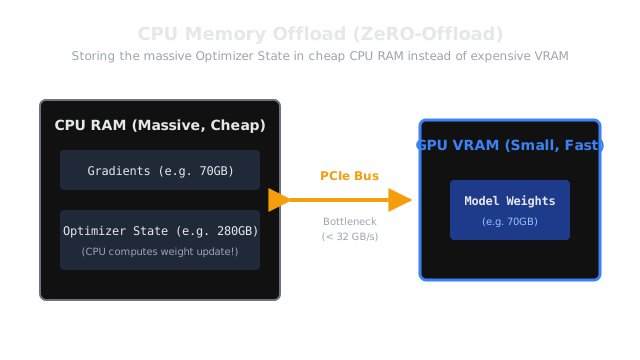
During training, the heaviest consumer of memory is not the model weights; it is the Optimizer State (the momentum and variance tracking variables used by AdamW). For a 70B model, the optimizer state takes up 560GB of memory!
DeepSpeed intelligently orchestrates a "swap" system over the PCIe bus (the physical slot that connects the GPU to the motherboard):
- The Parking Lot: The Optimizer States and Gradients are kept permanently in CPU RAM (or even on an NVMe SSD).
- The Forward Pass: The GPU computes the forward pass normally using the model weights in VRAM.
- The Backward Pass: The GPU computes the gradients. Because there is no room in VRAM to keep them, the GPU streams the gradients over the PCIe bus to the CPU memory immediately after calculating them.
- The Optimizer Step (On CPU): This is the clever part. Instead of moving 560GB of Optimizer states back to the GPU, DeepSpeed actually uses the CPU processor to calculate the weight updates. The CPU updates the weights in its own memory, and then sends just the updated, lightweight model weights back to the GPU for the next step.
Code
You do not write PCIe streaming logic manually. You enable it via a JSON configuration file in DeepSpeed.
{ "optimizer": { "type": "AdamW", "params": { "lr": 0.001 } }, "zero_optimization": { "stage": 3, "offload_optimizer": { "device": "cpu", "pin_memory": true }, "offload_param": { "device": "nvme", "nvme_path": "/mnt/fast_ssd" } }}In this config, DeepSpeed automatically offloads the heavy Optimizer to the CPU, and if the model is truly massive, it offloads the actual parameters to the SSD!
Watch Out For
The PCIe Bottleneck.
GPU VRAM operates at 3,000 GB/s. CPU RAM operates at 200 GB/s. But the PCIe 4.0 bus connecting them only operates at 32 GB/s. If you use memory offloading, you are trading money for time. Because the GPU has to sit idle waiting for the PCIe bus to transfer data from the CPU, training with CPU Offload is typically 2x to 5x slower than training purely in VRAM. Offloading to an NVMe SSD is even slower. Use it only when you absolutely cannot afford the required number of GPUs.
The Quick Version
- Memory Offloading temporarily moves ML training data from expensive GPU VRAM to cheap CPU RAM or SSDs.
- It allows you to train massive models on a small number of GPUs.
- ZeRO-Offload moves the massive Optimizer State and Gradients to the CPU. The CPU actually performs the weight update calculation.
- ZeRO-Infinity can offload the entire model to NVMe SSDs, allowing you to fine-tune a 1-Trillion parameter model on a single machine.
- The tradeoff is speed: transferring data back and forth over the PCIe bus causes the GPU to sit idle, drastically slowing down training.