Agent Cost Control
Because agents run in automated loops, a tiny logic error can cause them to make 10,000 API calls in an hour, draining your bank account. Agent Cost Control involves strict budgeting, caching, and model-routing to prevent financial disaster.
Why Does This Exist?
LLM providers (OpenAI, Anthropic) charge by the "Token" (roughly ¾ of a word). When you use ChatGPT normally, you send 50 words, you get 200 words back. It costs $0.005.
But when you run an Autonomous Agent, the cost equation changes dramatically:
- The Loop Multiplier: The agent might take 20 steps to solve a problem.
- The Context Accumulation: On Step 20, the prompt contains the entire history of Steps 1 through 19.
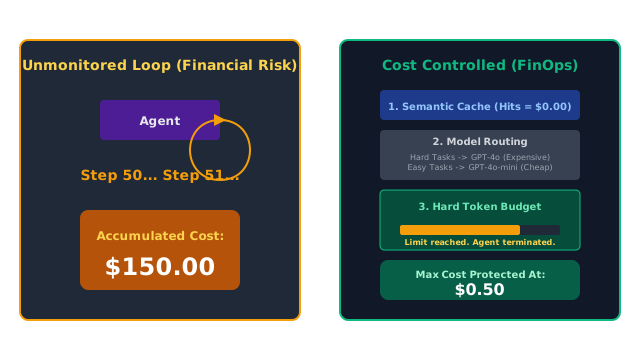
- The Infinite Loop Risk: If the agent encounters a bug, it might loop 500 times in 10 minutes.
A single, slightly complex task given to an agent can easily cost $1.50 in API credits. If you have 1,000 users running 10 agents a day, you will burn through $15,000 a day.
Agent Cost Control (often called AI FinOps) is the engineering practice of putting strict financial guardrails on your agents so you can actually run a profitable business.
Think of It Like This
The Open Bar
No Cost Control: You host a wedding and tell the bartender, "Keep pouring drinks for anyone who asks, put it all on my credit card." Your friend gets drunk, orders 50 bottles of expensive champagne for the room, and ruins your finances.
Cost Control: You give the bartender a strict rule: "No one gets more than 3 drinks. If they want a 4th drink, serve them cheap beer. If the total tab hits $2,000, shut down the bar immediately."
Core Strategies for Cost Control
1. Hard Token Budgets (The Kill Switch)
Every Agent Harness must track cumulative token usage. You explicitly define a budget: e.g., MAX_TOKENS = 50,000. If the agent's while-loop hits 50,001 tokens, the orchestration layer immediately kills the thread and returns an error to the user.
2. Model Routing
You do not need GPT-4o for everything.
- Use GPT-4o (Expensive) for complex reasoning (The Supervisor).
- Use GPT-4o-mini (Cheap) for simple tasks like formatting JSON or extracting dates. By dynamically routing easy tasks to cheaper models within your Multi-Agent System, you can reduce costs by up to 90%.
3. Semantic Caching
If User A asks the agent to "Summarize the Q3 Financial Report," the agent spends $0.50 doing it. If User B asks "Give me a summary of Q3 financials," you should NOT run the agent again. You use a vector database to realize the questions mean the same thing (Semantic Match), and you return the cached answer for $0.00.
4. Prompt Caching
Providers like Anthropic and OpenAI now support Prompt Caching. If you are sending the exact same 10,000-word System Prompt (or document) to the LLM 50 times in a row during a loop, you can flag it as "Cached". The provider keeps it in their RAM and gives you a massive discount (e.g., 50-80% off) for those tokens on subsequent calls.
Code
This code demonstrates how to implement a strict Hard Token Budget inside an agent's execution loop.
import openai
class TokenBudgetExceeded(Exception): pass
def agent_loop_with_budget(user_task, max_spend_dollars=0.50): # Costs per 1M tokens (Example pricing) INPUT_COST_PER_1M = 5.00 OUTPUT_COST_PER_1M = 15.00 total_cost = 0.0 messages = [{"role": "user", "content": user_task}] print(f"Starting agent. Budget: ${max_spend_dollars:.2f}") while True: # 1. Check budget BEFORE making the API call if total_cost > max_spend_dollars: raise TokenBudgetExceeded(f"Agent killed. Spent ${total_cost:.2f}, exceeding ${max_spend_dollars:.2f} budget.") # 2. Make the API call response = openai.chat.completions.create( model="gpt-4o", messages=messages ) # 3. Calculate exact cost for this specific turn usage = response.usage turn_input_cost = (usage.prompt_tokens / 1_000_000) * INPUT_COST_PER_1M turn_output_cost = (usage.completion_tokens / 1_000_000) * OUTPUT_COST_PER_1M turn_total_cost = turn_input_cost + turn_output_cost # 4. Add to running total total_cost += turn_total_cost print(f"Turn cost: ${turn_total_cost:.4f} | Total spent: ${total_cost:.4f}") # ... normal agent logic (checking if finished, executing tools) ... break # Simplified for example
# --- Execution ---try: agent_loop_with_budget("Write a comprehensive market analysis...")except TokenBudgetExceeded as e: print(f"\n🚨 {e}")
# -> Starting agent. Budget: \$0.50# -> Turn cost: \$0.0210 | Total spent: \$0.0210# -> (If it looped 25 times and hit \$0.51, it would raise the exception and die).Watch Out For
Variable Output Lengths
When setting hard budgets, remember that output tokens are usually 3x to 5x more expensive than input tokens. If an agent decides to generate a massive array of 10,000 JSON items, it can blow through your budget in a single API call, before your python while-loop gets a chance to check the running total. You must always use the max_tokens parameter on the actual API call (e.g., max_tokens=1000) to strictly bound the maximum possible cost of any single request.
The Quick Version
- Autonomous agents run in loops and accumulate context, making them exceptionally expensive.
- A single bug can cause an infinite loop, resulting in a catastrophic API bill.
- You must wrap your agents in a Harness that tracks exact token usage and enforces a hard dollar limit.
- You should implement Model Routing (using cheaper models for easy tasks) and Semantic Caching (reusing answers for identical questions) to make the economics of your application viable.