Automatic Prompt Optimization
Instead of manually tweaking a prompt when it fails, you feed the failure into an LLM. The LLM analyzes why the old prompt failed and automatically rewrites a new, better prompt.
Why Does This Exist?
Writing prompts is easy. Maintaining prompts is a nightmare.
Imagine you have a prompt that extracts names from text. It works great. Then, a user submits a text containing "Dr. Smith." The LLM extracts "Dr. Smith," but your backend expects just "Smith." You manually tweak the prompt: "Do not include titles like Dr." Now it works for "Dr. Smith," but it breaks on "Mr. Jones" because you didn't specify "Mr."
You are now trapped in a never-ending cycle of "Prompt Whack-a-Mole," where fixing one edge case breaks three others.
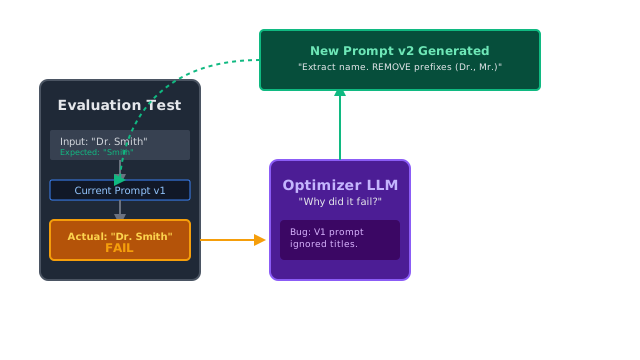
Automatic Prompt Optimization (APO) solves this. It treats prompt engineering as a Machine Learning problem. You define a suite of tests (evaluations). If the prompt fails a test, an "Optimizer LLM" automatically analyzes the failure, figures out what instructions were missing, and rewrites the prompt for you.
Think of It Like This
The Coach and the Player
Manual Prompting: You are a basketball coach. You tell a player (the LLM) to shoot the ball. They miss to the left. You yell, "Aim further right!" They shoot again and miss to the right. You yell, "Not that far right!" It's exhausting.
APO: You hire an assistant coach (the Optimizer LLM). The assistant coach watches a video of the player missing 10 shots in a row. The assistant coach analyzes their stance, realizes their left foot is angled wrong, and writes a highly specific 5-point checklist for the player to read before their next shot. The player's accuracy immediately jumps to 90%.
How It Actually Works
APO requires a testing framework. You cannot optimize a prompt if you don't have a dataset of correct answers to measure against.
1. The Dataset
You need a list of inputs and expected outputs (often called a Golden Dataset).
- Input: "Dr. John Smith" Expected Output: "John Smith"
- Input: "Mary Jenkins, PhD" Expected Output: "Mary Jenkins"
2. The Evaluation Run
You run your current System Prompt against the dataset.
- Input: "Dr. John Smith" Actual Output: "Dr. John Smith" ❌ (Failure)
3. The Optimizer (Meta-LLM)
You pass the failure into a specialized Meta-Prompt.
You are an expert prompt optimizer. Current Prompt: "Extract the name from the text."Test Input: "Dr. John Smith"Expected Output: "John Smith"Actual Output: "Dr. John Smith"
Analyze why the Current Prompt failed. Then, rewrite the Current Prompt so it will succeed.The Optimizer LLM realizes the prompt lacks instructions about titles. It outputs a new prompt: New Prompt: "Extract the name from the text. Remove any prefixes (like Dr., Mr.) or suffixes."
4. The Verification
You run the New Prompt against the dataset. If it passes all tests (including the ones the old prompt passed), you save the new prompt to production.
Code
While you can write this loop yourself, the industry standard for Automatic Prompt Optimization is a framework developed by Stanford called DSPy.
DSPy completely hides the prompt from the developer. You write Python code defining the input/output schema, provide a dataset, and DSPy's compiler automatically figures out the best prompt.
# Conceptual DSPy Example (Simplified)import dspy
# 1. Define the task signature (Input -> Output)class NameExtraction(dspy.Signature): """Extract only the first and last name, ignoring titles.""" raw_text = dspy.InputField(desc="Text containing a person's name") extracted_name = dspy.OutputField(desc="Just the first and last name")
# 2. Define the program moduleclass NameExtractor(dspy.Module): def __init__(self): super().__init__() # Tell DSPy to use a Chain of Thought approach for this signature self.extract = dspy.ChainOfThought(NameExtraction) def forward(self, raw_text): return self.extract(raw_text=raw_text)
# 3. Define the Training Datasettrainset = [ dspy.Example(raw_text="Dr. John Smith", extracted_name="John Smith").with_inputs('raw_text'), dspy.Example(raw_text="Mary Jenkins, PhD", extracted_name="Mary Jenkins").with_inputs('raw_text'), dspy.Example(raw_text="Mr. Adam West", extracted_name="Adam West").with_inputs('raw_text')]
# 4. Define an exact match metricdef exact_match(example, pred, trace=None): return example.extracted_name == pred.extracted_name
# 5. Compile! (This is where the magic APO happens)from dspy.teleprompt import BootstrapFewShot
teleprompter = BootstrapFewShot(metric=exact_match)
# DSPy will run the dataset, see where it fails, and automatically write and # inject the optimal instructions and few-shot examples into the underlying prompt.optimized_extractor = teleprompter.compile(NameExtractor(), trainset=trainset)
# Now you use the optimized model in productionresult = optimized_extractor(raw_text="Sir Patrick Stewart")print(result.extracted_name) # -> Patrick StewartWatch Out For
Overfitting the Dataset
If your training dataset only contains examples of "Dr." and "Mr.", the Optimizer LLM might rewrite the prompt to say: "Remove the words 'Dr.' and 'Mr.' from the text." When you deploy this to production, it will fail on "Mrs." or "Lord." Your training dataset must be highly diverse to force the Optimizer LLM to write general, robust instructions.
The Quick Version
- Manual prompt engineering results in "Whack-a-Mole," where fixing one edge case breaks another.
- APO uses an "Optimizer LLM" to analyze test failures and rewrite the prompt automatically.
- It treats prompts like neural network weights that can be updated via "training."
- DSPy is the leading open-source framework for treating prompt engineering as a programmatic compilation step rather than manual text editing.