Few-Shot Prompting
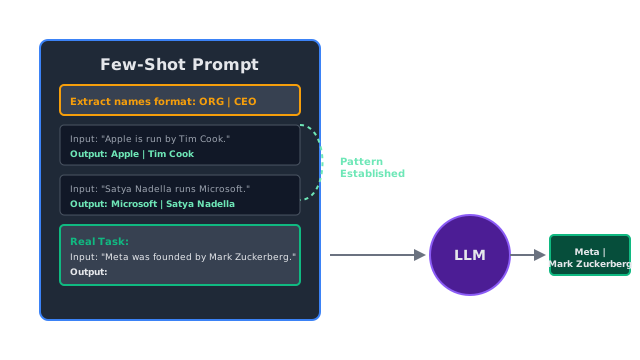
Instead of just giving the LLM instructions, you give it 2 or 3 examples of the exact input-output pairs you expect. The LLM copies the pattern.
Why Does This Exist?
Zero-Shot Prompting is incredibly convenient, but it is notoriously brittle when you need a specific output format.
If you ask an LLM: "Extract the names from this text: 'John and Mary went to the store.'"
It might output: "The names are John and Mary."
Or it might output: ["John", "Mary"]
Or it might output: Name 1: John, Name 2: Mary.
If you are building an automated pipeline, this inconsistency will crash your code. You can try to fix this by writing massive, paragraph-long instructions ("Output only a comma-separated list, do not include conversational filler, do not say 'Here are the names'..."), but LLMs often ignore complex negative constraints.
Few-Shot Prompting solves this elegantly. Instead of telling the model what to do, you show it. By providing 2 to 5 examples of perfect input/output pairs in the prompt, you trigger the LLM's most powerful ability: pattern recognition (also known as In-Context Learning).
Think of It Like This
Showing, not telling
Imagine hiring a contractor to format a massive bibliography.
Zero-Shot: You give them a 10-page manual on the APA citation style rules (margins, italics, punctuation). They will probably make a mistake.
Few-Shot: You hand them the manual, but you also hand them a sheet of paper with three perfectly formatted examples of a book citation, a journal citation, and a website citation. You say, "Make the rest look exactly like this." The contractor just copies the pattern. It is faster, easier, and dramatically more accurate.
How It Actually Works
When you pass examples into the LLM's context window, you are essentially doing "fine-tuning on the fly."
You structure the prompt with a clear delimiter between the examples and the final task.
Convert the word to its plural form.
Word: CatPlural: Cats
Word: ApplePlural: Apples
Word: OctopusPlural:When the LLM reads this, its internal attention mechanism latches onto the Word: [X] \n Plural: [Y] pattern. When it hits the final Plural:, the mathematical probability of it generating conversational filler (like "Sure, the plural is octopuses") drops to nearly zero, because that string of text breaks the established pattern. It is forced to output "Octopuses".
One-Shot vs Few-Shot
- One-Shot: Providing exactly one example. Good for establishing basic formatting.
- Few-Shot: Providing 2 to 5 examples. Essential when the task has edge cases (e.g., providing an example of a regular plural, and an example of an irregular plural like Goose Geese).
Code
This code demonstrates how to use Few-Shot prompting to force an LLM to output a specific proprietary data format.
import openai
def few_shot_extraction(text): # We want a very specific output format: "ORG | PERSON" # A zero-shot prompt would struggle to reliably output this exact syntax without filler. # We provide two examples to establish the pattern. prompt = f""" Extract the organization and the CEO from the text. Format your output EXACTLY as: [Organization] | [CEO Name] Text: "Microsoft is currently led by Satya Nadella." Output: Microsoft | Satya Nadella Text: "Mark Zuckerberg founded Facebook in his dorm." Output: Facebook | Mark Zuckerberg Text: "{text}" Output: """ response = openai.chat.completions.create( model="gpt-4o-mini", messages=[{"role": "user", "content": prompt}], temperature=0.0 ) return response.choices[0].message.content.strip()
# --- Execution ---new_text = "Apple's massive growth over the last decade was overseen by Tim Cook."print(few_shot_extraction(new_text))
# -> Apple | Tim Cook# The model perfectly copied the pipe-delimited pattern without any conversational filler.Watch Out For
Example Overfitting
If all of your few-shot examples share a hidden trait, the LLM will latch onto that trait instead of the actual instructions. For example, if you are classifying movie reviews, and all three of your "Positive" examples are short (1 sentence), and all three of your "Negative" examples are long (5 sentences), the LLM might start classifying all short texts as Positive, regardless of what they actually say. Your few-shot examples must be diverse and representative of real-world data.
Context Window Consumption
Every example you add to the prompt consumes tokens. If your task involves summarizing 10-page documents, you cannot realistically provide 5 few-shot examples, because 50 pages of examples will blow past the context window limits (and cost a fortune in API fees). Few-shot is best used for short-form tasks.
The Quick Version
- Zero-shot prompting relies on the LLM guessing what you want based on instructions. It often fails at strict formatting.
- Few-shot prompting provides 2 to 5 examples of the exact input and expected output inside the prompt.
- It triggers the LLM's pattern recognition capabilities (in-context learning).
- It is the most effective way to eliminate conversational filler and enforce strict output formats without doing actual model fine-tuning.