Parallel Tool Calling
Instead of calling one API, waiting 2 seconds, and then calling a second API, modern LLMs can output 5 tool calls at the exact same time, cutting response times drastically.
Why Does This Exist?
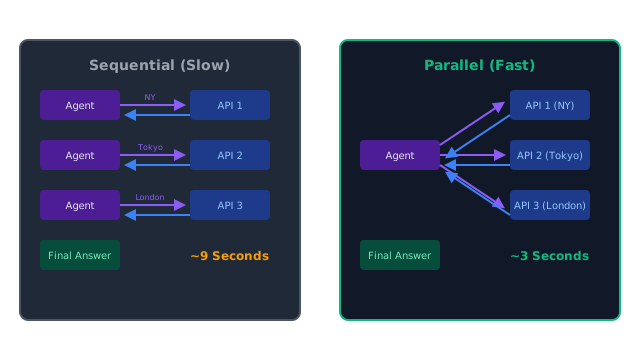
In the standard ReAct Pattern, an agent executes tools sequentially. If a user asks: "What is the weather in New York, Tokyo, and London?" The agent's thought loop looks like this:
Thought:I need to check New York.Action:get_weather("New York")Wait for Python API (2s) LLM processes result (1s)Thought:I need to check Tokyo.Action:get_weather("Tokyo")Wait for Python API (2s) LLM processes result (1s)Thought:I need to check London.Action:get_weather("London")Wait for Python API (2s) LLM processes result (1s)
Total Time: ~9 seconds.
This sequential looping is the primary reason why autonomous agents feel incredibly slow. Parallel Tool Calling is a feature built into modern frontier models (like GPT-4o and Claude 3.5 Sonnet) that allows the LLM to output an array of multiple tool calls in a single response.
Think of It Like This
The Drive-Thru
Sequential Calling: You go to the drive-thru window. You order a burger. The cashier walks away, cooks it, brings it back. You then say, "I also want fries." They walk away, cook it, bring it back. You then say, "I also want a soda."
Parallel Calling: You go to the window and say, "Burger, fries, and a soda." The cashier yells the order to the kitchen, three people make the items at the exact same time, and hand you the entire tray at once.
How It Actually Works
When the LLM decides it needs to use tools, instead of returning a single JSON object representing one tool, it returns a JSON array containing multiple tools.
Your Python backend must be programmed to handle this array.
Instead of executing one tool and immediately sending the result back to the LLM, your Python code must iterate through the array, execute all the tools (ideally asynchronously using asyncio), collect all the results, and send them all back to the LLM in a single batch.
The New Loop
Thought:I need to check all three cities.Action:[get_weather("NY"), get_weather("Tokyo"), get_weather("London")]Python:Executes all three APIs asynchronously (Max wait: 2s)Python:Returns all three results in one API call.LLM:Reads all three results and answers the user.
Total Time: ~3 seconds (a 3x speedup).
Code
This code demonstrates how to handle parallel tool calls using the OpenAI API. Notice how the Python backend uses a for loop to execute every tool requested before returning to the LLM.
import openaiimport json
# --- Dummy Tools ---def get_weather(location): print(f" [Backend] Fetching weather for {location}...") # Pretend this takes 2 seconds return f"72F and sunny in {location}"
def execute_parallel_tools(user_query): tools = [ { "type": "function", "function": { "name": "get_weather", "description": "Get current weather for a city", "parameters": { "type": "object", "properties": {"location": {"type": "string"}}, "required": ["location"] } } } ] messages = [{"role": "user", "content": user_query}] # 1. First LLM Call (The LLM decides to call tools) response = openai.chat.completions.create( model="gpt-4o", messages=messages, tools=tools ) message = response.choices[0].message messages.append(message) # Add assistant's tool request to history # 2. Check for Parallel Tool Calls if message.tool_calls: print(f"LLM requested {len(message.tool_calls)} tools in parallel.") # 3. Execute all requested tools BEFORE going back to the LLM for tool_call in message.tool_calls: # Parse the arguments the LLM provided args = json.loads(tool_call.function.arguments) # Execute our Python function result = get_weather(args["location"]) # Add the result to the message history, linking it to the specific tool_call.id messages.append({ "role": "tool", "tool_call_id": tool_call.id, "content": result }) # 4. Second LLM Call (The LLM reads all results and answers) print("All tools executed. Sending results back to LLM...") final_response = openai.chat.completions.create( model="gpt-4o", messages=messages ) print("\nFinal Answer:") print(final_response.choices[0].message.content)
# --- Execution ---execute_parallel_tools("What's the weather like in NY, Tokyo, and London right now?")
# -> LLM requested 3 tools in parallel.# -> [Backend] Fetching weather for NY...# -> [Backend] Fetching weather for Tokyo...# -> [Backend] Fetching weather for London...# -> All tools executed. Sending results back to LLM...# -> # -> Final Answer:# -> Right now, it is 72F and sunny in New York, Tokyo, and London.Watch Out For
Dependent Actions
Parallel calling only works if the tools are independent.
If the user asks: "Look up the ID for customer John Smith, and then fetch the billing history for that ID," the LLM cannot run these in parallel. It must wait for the first tool (lookup_user) to return the ID before it can formulate the arguments for the second tool (fetch_billing).
Modern LLMs are smart enough to automatically switch between parallel and sequential calling depending on whether the arguments of one tool rely on the output of another.
The Quick Version
- Sequential tool calling is slow because it requires a full API round-trip to the LLM for every single tool used.
- Parallel tool calling allows the LLM to output a JSON array of multiple tool requests at once.
- Your backend code must be designed to loop through (or asynchronously execute) every requested tool, collect the results, and send them back to the LLM in one batch.
- This dramatically reduces latency, making complex autonomous agents feel much more responsive.