Model Quantization for Serving
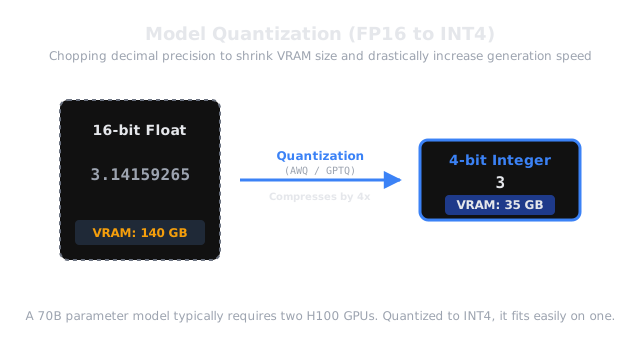
Instead of storing every decimal number in the model with extreme 16-decimal-place precision, we chop off the ends of the decimals. The model's file size shrinks by 4x, it runs much faster, and surprisingly, it barely loses any intelligence.
Why Does This Exist?
By default, neural network weights are stored as 16-bit Floating Point numbers (FP16 or bfloat16). A 70-Billion parameter model, where each parameter takes 16 bits (2 bytes), requires 140 GB of VRAM just to load the weights. This means you must rent at least two 80GB H100 GPUs (costing $6.00/hour) just to serve it.
What if you could compress those numbers? What if, instead of 16 bits, you used 8 bits, or even 4 bits per number? Model Quantization does exactly this. By quantizing a 70B model to 4-bit (INT4), the size drops from 140GB down to just 35GB. Now, you can easily serve the entire 70B model on a single, cheap, consumer-grade GPU.
Furthermore, LLM inference is almost always bottlenecked by Memory Bandwidth (the speed at which data travels from the VRAM chips to the GPU's compute cores). Because a quantized model is 4x smaller, it travels across the memory bus 4x faster, leading to a massive increase in token generation speed.
Think of It Like This
Think of It Like This
Imagine a recipe that calls for 3.141592 grams of salt and 1.99983 grams of pepper.
You need highly precise digital scales to measure this, which takes a lot of time and effort (FP16).
Quantization is like rewriting the recipe to just say 3 grams of salt and 2 grams of pepper (INT8). It is much faster and easier to measure. The final soup might taste fractionally different to a master chef, but 99.9% of customers won't notice the difference at all.
Types of Quantization
Not all quantization is created equal. There are two primary places you can apply it in a production serving stack.
1. Weight Quantization (GPTQ / AWQ / GGUF)
This is the most common form. You compress the model's weights before deployment.
- GPTQ (Post-Training Quantization): A mathematical method that carefully compresses the weights to 4-bit while attempting to minimize the loss of accuracy. It requires running a calibration dataset through the model once.
- AWQ (Activation-Aware Weight Quantization): Similar to GPTQ, but it identifies the top 1% of weights that are the most "important" to the model's intelligence. It keeps those important weights in FP16, and compresses the rest to 4-bit. It generally yields better accuracy than GPTQ.
- GGUF (llama.cpp): A wildly popular format for running quantized models on Apple MacBooks and standard CPUs.
2. KV Cache Quantization (FP8 / INT8)
In kv-cache-management, we learned that the KV Cache can consume massive amounts of memory.
You can actually quantize the KV Cache in real-time as the model generates text. When the engine saves the conversation history, it compresses it from 16-bit to 8-bit (FP8). This instantly doubles the number of concurrent users you can fit onto your GPU without changing the model weights at all.
Code
You rarely quantize a model yourself from scratch. You usually download a pre-quantized version from Hugging Face (often created by the community group "TheBloke"). However, you can configure your Inference Engine (like vLLM) to use these quantized formats easily.
# Launch vLLM using a 4-bit AWQ quantized model# This 70B model will now magically fit on a single GPU!python -m vllm.entrypoints.openai.api_server \ --model TheBloke/Llama-2-70B-chat-AWQ \ --quantization awq \ --kv-cache-dtype fp8Notice we enabled both AWQ weight quantization and FP8 KV Cache quantization in the same command!
Watch Out For
The Quantization Accuracy Wall.
Quantizing from 16-bit to 8-bit (INT8) is generally considered a "free lunch"—the model loses virtually zero accuracy. Quantizing to 4-bit (INT4) causes a slight, measurable degradation, especially in complex math or coding tasks. Quantizing to 3-bit or 2-bit causes the model's intelligence to collapse completely. Always benchmark your specific use case. If you need flawless legal reasoning, stick to 8-bit or 16-bit.
The Quick Version
- Neural networks default to 16-bit precision, making them massively expensive to host.
- Quantization compresses the decimal numbers down to 8-bit or 4-bit integers.
- This shrinks the file size by 2x to 4x, allowing massive models to fit on single GPUs.
- Because the data is smaller, it moves through the GPU memory bus faster, drastically speeding up generation.
- AWQ and GPTQ are the leading algorithms for quantizing weights.
- You can (and should) also quantize the KV Cache to serve more concurrent users.