Prompting Anti-Patterns
Using polite words, writing giant mega-prompts, and focusing on what NOT to do instead of what TO do are common mistakes that make LLMs perform worse, not better.
Why Does This Exist?
When developers first transition from traditional coding to GenAI, they treat LLMs like humans. They use conversational language, they are overly polite, and when the LLM makes a mistake, they just add another angry paragraph to the top of the prompt telling it to stop making that mistake.
This results in prompts that are slow, expensive, and incredibly brittle.
Recognizing and eliminating Prompting Anti-Patterns is the difference between a brittle AI prototype and a robust production application.
1. The "Mega-Prompt" (Lack of Chaining)
The Anti-Pattern: Writing a 1,000-word prompt asking a single LLM call to extract data, cross-reference it, translate it, format it as JSON, and write a summary.
Why it fails: LLMs have finite attention. If you give them 5 complex constraints, they will likely drop one. They might translate perfectly but forget the JSON formatting.
The Fix: Use Prompt Chaining. Break the Mega-Prompt into three separate prompts (Node 1: Extract, Node 2: Translate, Node 3: Format) and pass the output of one into the input of the next using Python.
2. Negative Constraints (The "Pink Elephant" Problem)
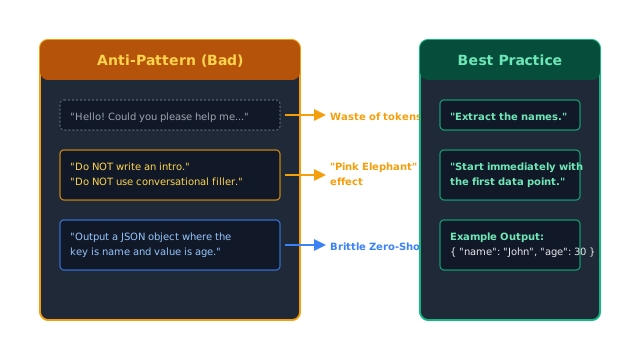
The Anti-Pattern: Focusing heavily on what the LLM should not do. "Do not write a long introduction. Do not include conversational filler. Never say 'Here is the code'. Do not use markdown."
Why it fails: If I tell you, "Do not think about a pink elephant," what do you think about? LLMs work on semantic attention. By repeating the words "conversational filler" and "markdown," you are actually increasing the mathematical probability that the LLM will generate those exact tokens.
The Fix: Use positive, affirmative constraints. Tell it exactly what it should do, rather than what it shouldn't. Bad: "Do not write an introduction." Good: "Start your response immediately with the first data point."
3. Conversational Filler and Politeness
The Anti-Pattern: Treating the API like a human coworker. "Hello! Could you please help me parse this text if you have a moment? I would really appreciate it. Thanks!"
Why it fails:
- Cost: You pay per token. "Could you please help me" is 6 tokens you are paying for on every single API call. Across millions of calls, you are spending thousands of dollars on politeness.
- Dilution: Every word in a prompt dilutes the attention placed on the actual instructions.
The Fix: Be a dictator. Use sharp, imperative commands. Bad: "Could you please extract the names?" Good: "Extract the names."
4. Zero-Shot Formatting
The Anti-Pattern: Trying to force a complex output schema (like deeply nested JSON or proprietary XML) using only written instructions in a Zero-Shot Prompt. "Output a JSON object where the key is 'user_data' and the value is a list of dictionaries containing 'id' and 'name'."
Why it fails: LLMs are bad at strictly following structural rules described in English paragraphs. They will frequently miss a comma, misspell a key, or add conversational filler before the JSON block, crashing your parser.
The Fix: Use Few-Shot Prompting. Do not explain the format; show the format. Provide 2 examples of perfectly formatted JSON inside the prompt so the LLM can just copy the pattern.
5. Burying the Lead (Order Matters)
The Anti-Pattern: Putting the actual task instruction at the very end of a massive document. (3 pages of Context) "Given the above, summarize the third paragraph."
Why it fails: LLMs exhibit a phenomenon called the "Lost in the Middle" effect. Their attention mechanism heavily weights the very beginning and the very end of the prompt context, and tends to ignore the middle.
The Fix: Use proper Prompt Anatomy. Put the primary instructions at the very top (System Prompt), put the massive context in the middle, and reiterate the most critical instruction at the very bottom (User Prompt).
The Quick Version
If your prompt isn't working, check for these 5 anti-patterns:
- Too complex? Break it into a chain.
- Too negative? Rewrite "Don't do X" as "Only do Y."
- Too polite? Delete the pleasantries; use imperative commands.
- Format failing? Stop describing the format and provide a Few-Shot example instead.
- Ignoring rules? Move the most important rule to the very end of the prompt.